Sync WhatsApp with HubSpot and Pipedrive
Your customers write to you on WhatsApp. Your sales and support teams live in a CRM. When the two don't talk, conversations vanish into someone's phone, the next person on the account starts from zero, and "did anyone reply to her?" becomes a daily question.
This guide shows how to sync WhatsApp with your CRM using WhatsMCP webhooks and the REST API — with complete, working code for HubSpot and Pipedrive. Every inbound WhatsApp message finds or creates the right contact and lands on their timeline, and your CRM can send WhatsApp messages back when something happens, like a deal moving to Won. The same pattern works for any CRM with an API.
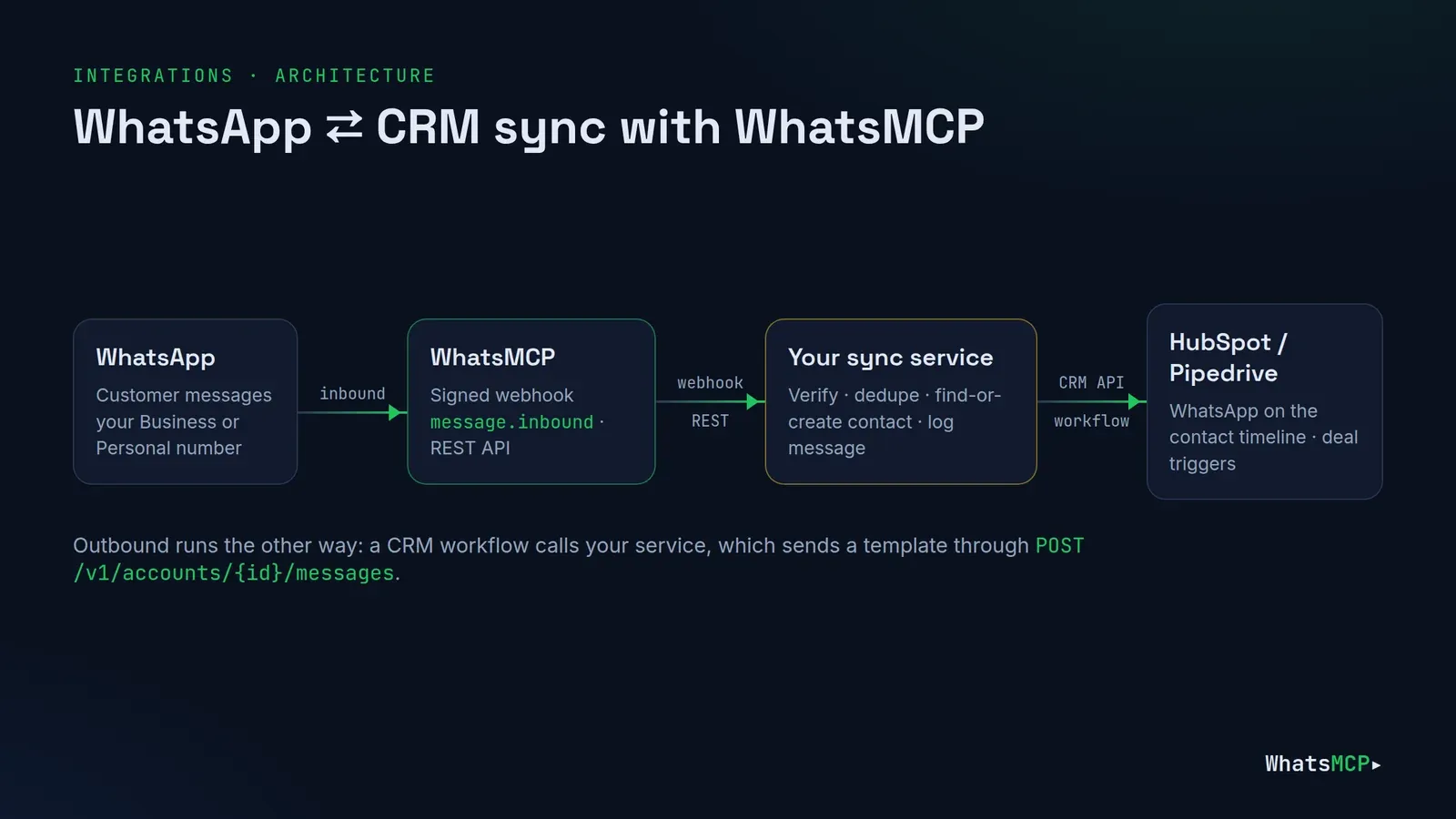
What you'll build
A small service — about 150 lines of Node.js — that sits between WhatsMCP and your CRM:
- Inbound: WhatsMCP posts each incoming message to the service as a signed webhook. The service verifies it, looks up the sender's name, finds or creates the contact by phone number, and logs the message on their timeline.
- Outbound: the CRM calls the service when a deal changes stage. The service sends a WhatsApp message — an approved template on a Business number — through the WhatsMCP REST API.
It works with both kinds of WhatsApp number: an official WhatsApp Business API number or a Personal number linked as a device. (Not sure which you need? See Personal WhatsApp vs WhatsApp Business API.)
What you need
- A WhatsMCP workspace with a connected number — create one here. Webhooks are included on every Business plan and on paid Personal plans.
- A WhatsMCP API key from Console → API keys (
wamcp_live_…, shown once). - Your CRM credentials:
- HubSpot: a private app (Settings → Integrations → Private apps) with the scopes
crm.objects.contacts.readandcrm.objects.contacts.write. Its access token starts withpat-. HubSpot's newer developer platform offers single-account "static auth" apps too; either gives you a bearer token. - Pipedrive: your personal API token (Personal preferences → API) and your company domain (
acmeinacme.pipedrive.com).
- HubSpot: a private app (Settings → Integrations → Private apps) with the scopes
- Somewhere to run the service with a public HTTPS URL — any small server, container or serverless function. Node.js 18 or later.
Step 1 — Register the webhook
Point WhatsMCP at your service. With the REST API:
curl -X PUT https://api.whatsmcp.com/v1/webhook \
  -H "X-API-Key: $WAMCP_KEY" -H "Content-Type: application/json" \
  -d '{"url": "https://sync.example.com/whatsapp/webhook"}'
You can also do it from Console → Webhooks, or ask your AI agent to call wa_set_webhook. The response includes a signing secret, shown once — store it as WAMCP_WEBHOOK_SECRET. A workspace has one webhook, so if you need several consumers, fan out from this service.
What WhatsMCP sends
Each inbound message arrives as a POST with a JSON body:
{
  "event": "message.inbound",
  "delivery_id": "01JB…",
  "tenant_id": "01JA…",
  "account_id": "01J9…",
  "account_phone": "447700900000",
  "message_seq": 48210,
  "message_id": "3EB0…",
  "chat_jid": "[email protected]",
  "peer": "447700900111",
  "kind": "text",
  "body": "are you open on Sunday?",
  "at": "2026-09-02T14:21:07Z"
}
And these headers:
| Header | What it's for |
|---|---|
X-WAMCP-Signature |
t=<unix time>,v1=<hex HMAC-SHA256 of "<t>.<raw body>" with your secret> |
X-WAMCP-Delivery |
A unique delivery id — use it to ignore duplicates |
X-WAMCP-Event |
message.inbound |
Things worth knowing before you write code:
- Only inbound messages are sent. Messages you send — from this service, the console or a phone — don't trigger the webhook. Log your own sends when you make them (the code below shows where).
- The sender's name isn't in the payload.
peeris their number in international digits, no+. Fetch the full message from the REST API when you needsender_name. - Delivery is at least once. Answer any
2xxto acknowledge. Anything else is retried with backoff — up to 8 attempts over about a day — so make your handler idempotent. - Never answer
410 Gone. WhatsMCP treats 410 as "this endpoint is gone" and switches the webhook off. Return500for a temporary problem and let the retry happen. - Order isn't guaranteed. Deliveries can arrive out of order; sort by
atormessage_seqif order matters.
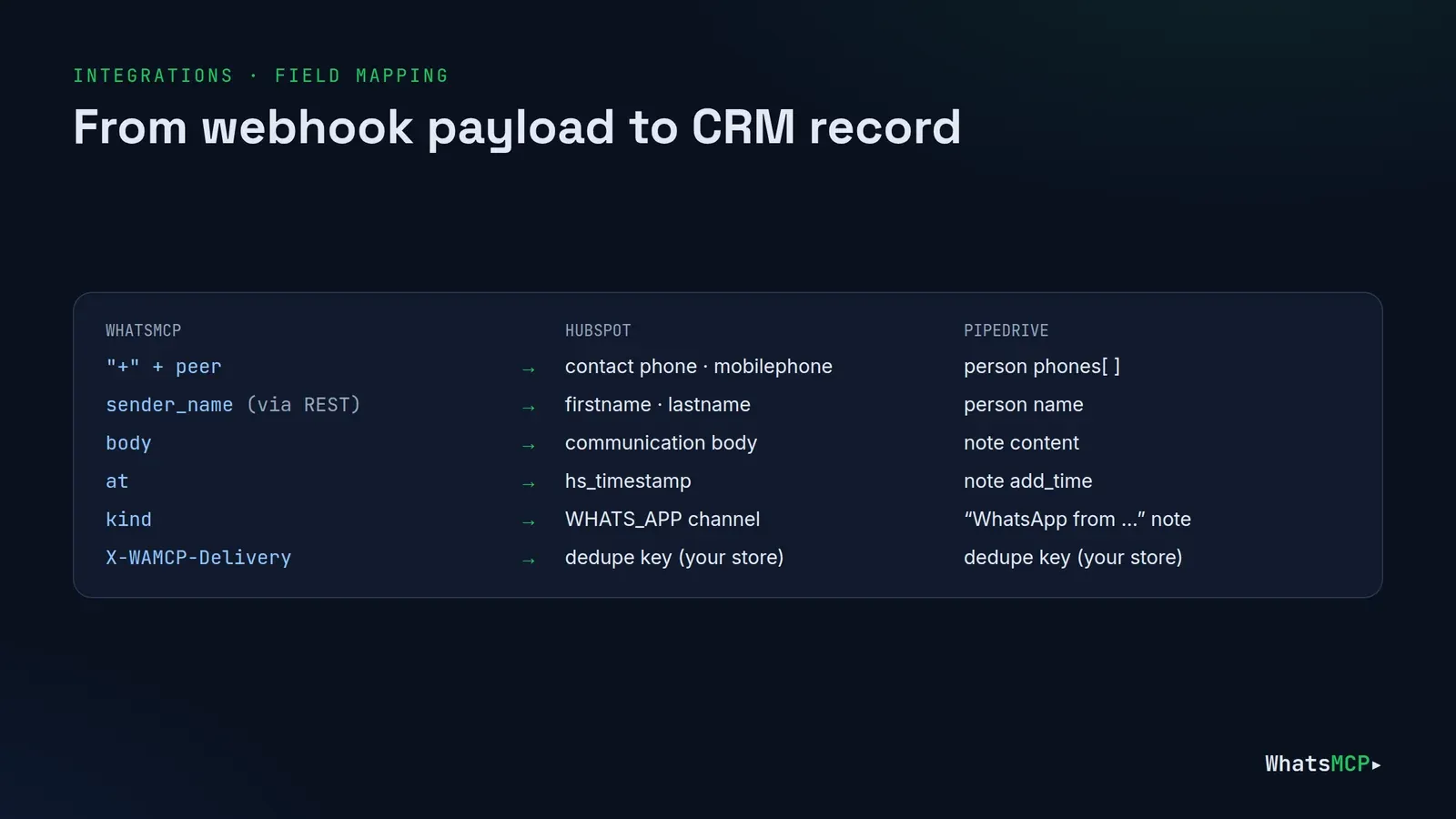
Step 2 — The sync service
Here's the whole service. It runs either CRM, chosen with CRM=hubspot or CRM=pipedrive.
// sync.mjs — WhatsApp ⇄ CRM sync for WhatsMCP (Node.js 18+, Express 5)
import express from "express";
import crypto from "node:crypto";
const env = process.env;
const WAMCP = "https://api.whatsmcp.com/v1";
const app = express();
const seen = new Set(); // use Redis or your database in production
// --- WhatsMCP -------------------------------------------------------------
async function wamcp(path, init = {}) {
const r = await fetch(WAMCP + path, {
...init,
headers: { "X-API-Key": env.WAMCP_KEY, "Content-Type": "application/json" },
});
if (!r.ok) throw new Error(`WhatsMCP ${r.status}: ${await r.text()}`);
return r.json();
}
function verifySignature(raw, header) {
const parts = Object.fromEntries(header.split(",").map((p) => p.split("=")));
const t = Number(parts.t);
if (!t || Math.abs(Date.now() / 1000 - t) > 300) return false; // 5-minute window
const want = crypto.createHmac("sha256", env.WAMCP_WEBHOOK_SECRET)
.update(`${t}.${raw}`).digest("hex");
const a = Buffer.from(want), b = Buffer.from(parts.v1 || "");
return a.length === b.length && crypto.timingSafeEqual(a, b);
}
async function senderName(ev) {
const { message } = await wamcp(
`/accounts/${ev.account_id}/messages/${encodeURIComponent(ev.message_id)}`);
return message?.sender_name || `+${ev.peer}`;
}
// --- HubSpot --------------------------------------------------------------
async function hubspot(path, body) {
const r = await fetch("https://api.hubapi.com" + path, {
method: "POST",
headers: { Authorization: `Bearer ${env.HUBSPOT_TOKEN}`, "Content-Type": "application/json" },
body: JSON.stringify(body),
});
if (!r.ok) throw new Error(`HubSpot ${r.status}: ${await r.text()}`);
return r.json();
}
async function logToHubSpot({ phone, name, text, at }) {
const found = await hubspot("/crm/v3/objects/contacts/search", {
filterGroups: ["phone", "mobilephone"].map((p) => ({
filters: [{ propertyName: p, operator: "EQ", value: phone }],
})),
properties: ["firstname", "lastname"],
limit: 1,
});
let id = found.results[0]?.id;
if (!id) {
const [firstname, ...rest] = name.split(" ");
id = (await hubspot("/crm/v3/objects/contacts", {
properties: { firstname, lastname: rest.join(" "), phone, mobilephone: phone },
})).id;
}
await hubspot("/crm/v3/objects/communications", {
properties: {
hs_communication_channel_type: "WHATS_APP",
hs_communication_logged_from: "CRM",
hs_communication_body: text,
hs_timestamp: at,
},
associations: [{
to: { id },
types: [{ associationCategory: "HUBSPOT_DEFINED", associationTypeId: 81 }],
}],
});
}
// --- Pipedrive ------------------------------------------------------------
async function pipedrive(method, path, body) {
const r = await fetch(`https://${env.PIPEDRIVE_DOMAIN}.pipedrive.com/api${path}`, {
method,
headers: { "x-api-token": env.PIPEDRIVE_TOKEN, "Content-Type": "application/json" },
body: body && JSON.stringify(body),
});
if (!r.ok) throw new Error(`Pipedrive ${r.status}: ${await r.text()}`);
return r.json();
}
const escapeHtml = (s) => s.replace(/[&<>]/g, (c) => ({ "&": "&", "<": "<", ">": ">" })[c]);
async function logToPipedrive({ phone, name, text, at }) {
const q = new URLSearchParams({ term: phone, fields: "phone", exact_match: "true", limit: "1" });
const found = await pipedrive("GET", `/v2/persons/search?${q}`);
let personId = found.data?.items?.[0]?.item?.id;
if (!personId) {
personId = (await pipedrive("POST", "/v2/persons", {
name,
phones: [{ value: phone, primary: true, label: "mobile" }],
})).data.id;
}
await pipedrive("POST", "/v1/notes", {
person_id: personId,
content: `<b>WhatsApp from ${phone}</b><br>${escapeHtml(text)}`,
add_time: at.replace("T", " ").slice(0, 19), // "YYYY-MM-DD HH:MM:SS"
});
}
const logToCrm = env.CRM === "pipedrive" ? logToPipedrive : logToHubSpot;
// --- Inbound: WhatsMCP → CRM ---------------------------------------------
app.post("/whatsapp/webhook", express.raw({ type: "application/json" }), async (req, res) => {
const raw = req.body.toString("utf8");
if (!verifySignature(raw, req.get("X-WAMCP-Signature") || "")) return res.sendStatus(401);
const delivery = req.get("X-WAMCP-Delivery");
if (seen.has(delivery)) return res.sendStatus(200); // already handled
const ev = JSON.parse(raw);
if (ev.event !== "message.inbound" || ev.chat_jid?.endsWith("@g.us")) {
return res.sendStatus(200); // skip groups: they aren't one customer
}
try {
await logToCrm({
phone: `+${ev.peer}`,
name: await senderName(ev),
text: ev.body || `[${ev.kind} message]`,
at: ev.at,
});
seen.add(delivery);
res.sendStatus(200);
} catch (err) {
console.error(err);
res.sendStatus(500); // WhatsMCP will retry — never 410
}
});
// --- Outbound: CRM → WhatsApp ---------------------------------------------
async function sendTemplate(phone, template, variables) {
return wamcp(`/accounts/${env.WAMCP_ACCOUNT_ID}/messages`, {
method: "POST",
body: JSON.stringify({
to: phone.replace(/\D/g, ""), // digits only
template,
template_language: "en_US",
template_variables: variables,
}),
});
}
// Refuses when the expected secret isn't configured, so a missing env var never opens the door.
const sameSecret = (got = "", want = "") =>
want.length > 0 && got.length === want.length &&
crypto.timingSafeEqual(Buffer.from(got), Buffer.from(want));
// HubSpot workflow "Send a webhook" → POST here with header X-API-Key
app.post("/crm/hubspot/deal-won", express.json(), async (req, res) => {
if (!sameSecret(req.get("X-API-Key"), env.OUTBOUND_KEY)) return res.sendStatus(401);
const { phone, firstname, dealname } = req.body;
if (!phone) return res.sendStatus(200);
await sendTemplate(phone, "order_update", [firstname || "there", dealname]);
// optionally log the sent message back to the contact here
res.sendStatus(200);
});
// Pipedrive webhook (deal changed) → POST here with Basic auth
app.post("/crm/pipedrive/deal", express.json(), async (req, res) => {
const basic = Buffer.from((req.get("Authorization") || "").replace(/^Basic /, ""), "base64").toString();
const expected = env.PD_HOOK_USER && env.PD_HOOK_PASS ? `${env.PD_HOOK_USER}:${env.PD_HOOK_PASS}` : "";
if (!sameSecret(basic, expected)) return res.sendStatus(401);
const { data, previous } = req.body;
const movedToWon = previous && "stage_id" in previous &&
data?.stage_id === Number(env.PD_WON_STAGE_ID);
if (!movedToWon || !data.person_id) return res.sendStatus(200);
const person = (await pipedrive("GET", `/v2/persons/${data.person_id}`)).data;
const phone = (person.phones?.find((p) => p.primary) ?? person.phones?.[0])?.value;
if (phone) await sendTemplate(phone, "order_update", [person.name, data.title]);
res.sendStatus(200);
});
app.listen(env.PORT || 3000, () => console.log("WhatsApp ⇄ CRM sync listening"));
Run it with your environment:
npm install express@5
WAMCP_KEY=wamcp_live_… WAMCP_WEBHOOK_SECRET=… WAMCP_ACCOUNT_ID=acct_… \
CRM=hubspot HUBSPOT_TOKEN=pat-… OUTBOUND_KEY=$(openssl rand -hex 24) \
node sync.mjs
WAMCP_ACCOUNT_ID is the number to send from — GET /v1/accounts lists them.
How the HubSpot side works
- Find the contact. The CRM Search API looks for the number in both
phoneandmobilephone(two filter groups are combined with OR). - Create if missing, with the WhatsApp name split into first and last name.
- Log the message as a WhatsApp communication. HubSpot's Communications object has a dedicated
WHATS_APPchannel type, so messages show on the contact's timeline as WhatsApp messages — not as generic notes. The association type81links a communication to a contact.
Phone numbers are the main gotcha. Store numbers in E.164 (+447700900111) without spaces, and test the search against your real data — numbers typed into HubSpot as 07700 900111 may not match. Brand-new contacts can also take a moment to appear in search results, so two messages in quick succession may race; a short retry before creating, or a cache of recent phone→contact ids, solves it.
HubSpot also offers its own WhatsApp inbox connection through Meta. This approach is for when you want WhatsApp in the CRM and in your AI agents and backend — one number, one integration, every surface.
How the Pipedrive side works
- Find the person with
GET /api/v2/persons/search, restricted to the phone field with an exact match. - Create if missing with
POST /api/v2/personsand aphonesarray. - Log the message as a note with
POST /v1/notes— still the supported endpoint for notes. A note sits on the person's timeline, which suits a received message better than an activity (a to-do).
The same phone-format advice applies: keep one canonical format. Pipedrive's search costs more of your API budget than other calls, so the find-or-create cache helps here too.
Step 3 — Send WhatsApp messages from the CRM
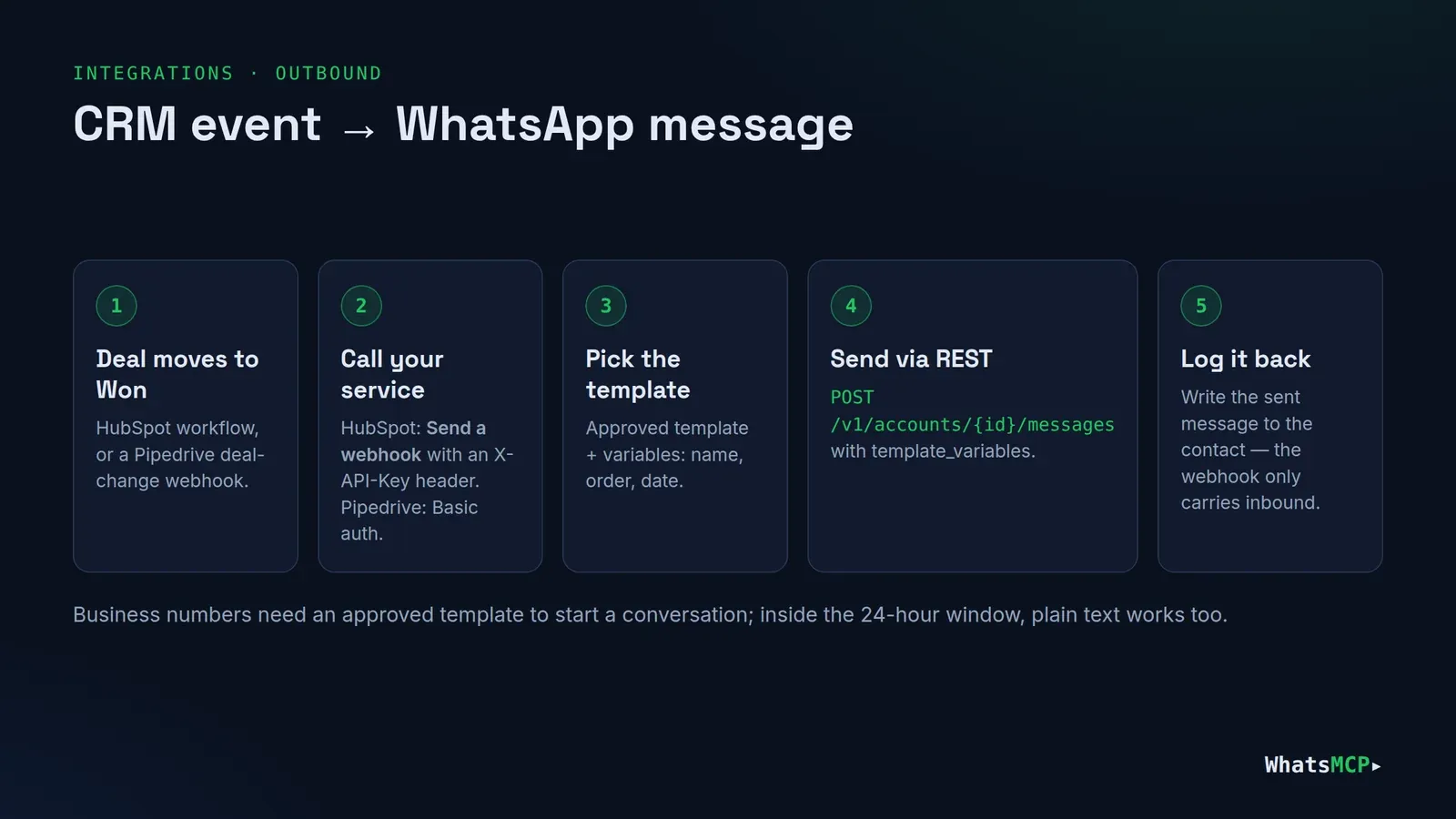
From HubSpot
Create a deal-based workflow — for example Deal stage is Closed won — and add the Send a webhook action:
- Method:
POST, URL:https://sync.example.com/crm/hubspot/deal-won - Authentication: API key, header
X-API-Key, value = yourOUTBOUND_KEY - Body: a custom body with the associated contact's
phoneandfirstnameand the deal'sdealname
The webhook action needs Data Hub (formerly Operations Hub) Professional or Enterprise. On other tiers, trigger the same endpoint from a HubSpot app, a Zap, or your own scheduler.
From Pipedrive
Register a webhook for deal changes, with Basic auth (Pipedrive webhooks can't add custom headers):
curl -X POST "https://acme.pipedrive.com/api/v1/webhooks" \
  -H "x-api-token: $PIPEDRIVE_TOKEN" -H "Content-Type: application/json" \
  -d '{"subscription_url":"https://sync.example.com/crm/pipedrive/deal",
       "event_action":"change","event_object":"deal","version":"2.0",
       "http_auth_user":"pd","http_auth_password":"a-long-random-secret"}'
Pipedrive sends the deal's current state as data and the changed fields as previous, so the service checks that stage_id changed and is now your Won stage (PD_WON_STAGE_ID).
Templates and the 24-hour window
On a Business number, a message your company starts must be an approved template — that's why the service sends order_update with variables. Inside 24 hours of the customer's last message you can also send free-form text ({"to": "…", "text": "…"}). How to write templates that pass review: WhatsApp message templates Meta approves.
On a Personal number there are no templates — send text instead — but keep CRM-triggered messages to people who expect them. Unsolicited messages are what gets numbers restricted.
Production checklist
- Persist idempotency. Replace the in-memory
seenset with Redis or a database table keyed onX-WAMCP-Delivery. - Queue slow work. Acknowledge quickly and process in a background job if your CRM calls are slow; WhatsMCP waits 10 seconds per delivery.
- Respect rate limits. HubSpot limits search requests per second; Pipedrive budgets API tokens per day and per two seconds. Cache phone→contact ids.
- Log your own sends. The webhook only carries inbound messages, so write each message you send to the CRM yourself — the REST response gives you its
message_id. - Catch up after downtime. If the service was down past the retry window, read anything missed with
GET /v1/messages?after_cursor=<last message_seq>. - Media. For images and documents,
GET /v1/accounts/{account_id}/messages/{message_id}/mediareturns the file, which you can attach in the CRM. - Groups. The code skips group chats, which don't map to one customer. Handle them separately if you need to.
- Secrets live in your secret manager, never in code. Rotate the webhook secret by calling
PUT /v1/webhookagain.
FAQ
Do I need to write code?
For this approach, yes — a small service like the one above. Native one-click CRM connectors are on the way; until then, this gives you full control over what's logged and when.
Does it work with an official WhatsApp Business API number?
Yes. Business and Personal numbers deliver the same webhook payload and use the same REST API. Business numbers add templates and the 24-hour window.
Will messages I send from my phone appear in the CRM?
Not through the webhook, which carries inbound messages only. Read outbound messages from GET /v1/messages (each has a direction) if you want both sides.
Can I use Zapier, Make or n8n instead of a service?
Yes, if your workflow tool can verify the signature or sits behind something that does: point the webhook at it, and call the REST API to send. The same rules apply — acknowledge with 2xx, dedupe on X-WAMCP-Delivery, and never return 410.
What about other CRMs?
The pattern is identical: find or create by phone, log the message, call POST /v1/accounts/{account_id}/messages to reply. Swap the HubSpot or Pipedrive functions for your CRM's API.
Get started
Create your WhatsMCP workspace, connect a number, add a webhook, and deploy the service above. The REST reference and OpenAPI spec are at whatsmcp.com/docs/rest, and webhook details are in WhatsMCP webhooks: setup guide.
About WhatsMCP Engineering
Engineering Team at WhatsMCP. The team building WhatsMCP's MCP server and SIP bridge — the people who wrote the code these posts describe.