WhatsApp Message Templates Meta Approves
On the WhatsApp Business API, you can't just message a customer whenever you like. To start a conversation — or to pick one up again more than 24 hours after the customer last wrote — you need a message template that Meta has reviewed and approved. Get templates right and your agent can send order updates, reminders and follow-ups all day. Get them wrong and they bounce back as Rejected, or get quietly re-categorized as marketing and cost more.
This guide explains how WhatsApp message templates work, the rules Meta reviews them against, the most common reasons they're rejected, and ten examples you can adapt. It finishes with how to create and send templates from an AI agent through WhatsMCP.
What a template is — and when you need one
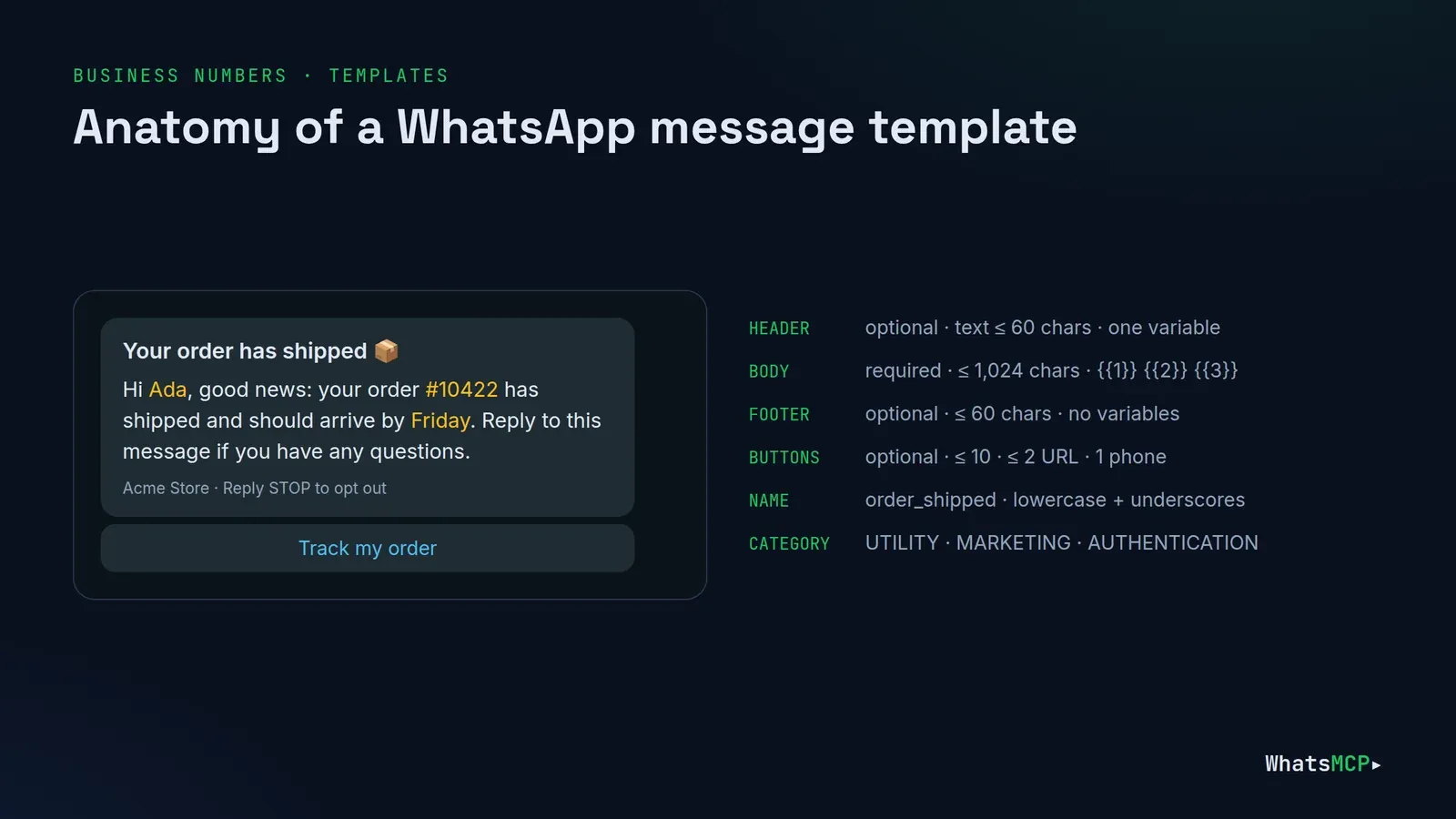
A template is a pre-written message with placeholders — Hi {{1}}, your order {{2}} has shipped — that Meta approves once and you then send many times with different values. You need one when:
- You message first. Any conversation your business starts needs a template.
- The 24-hour window has closed. You can reply freely for 24 hours after the customer's last message; after that, only a template can re-open the conversation.
Inside an open 24-hour window, ordinary replies are fine and no template is needed. (Meta charges per message either way under its own pricing — including replies inside the window since 1 October 2026.)
The three categories
Every template has a category, and Meta checks that the content matches it.
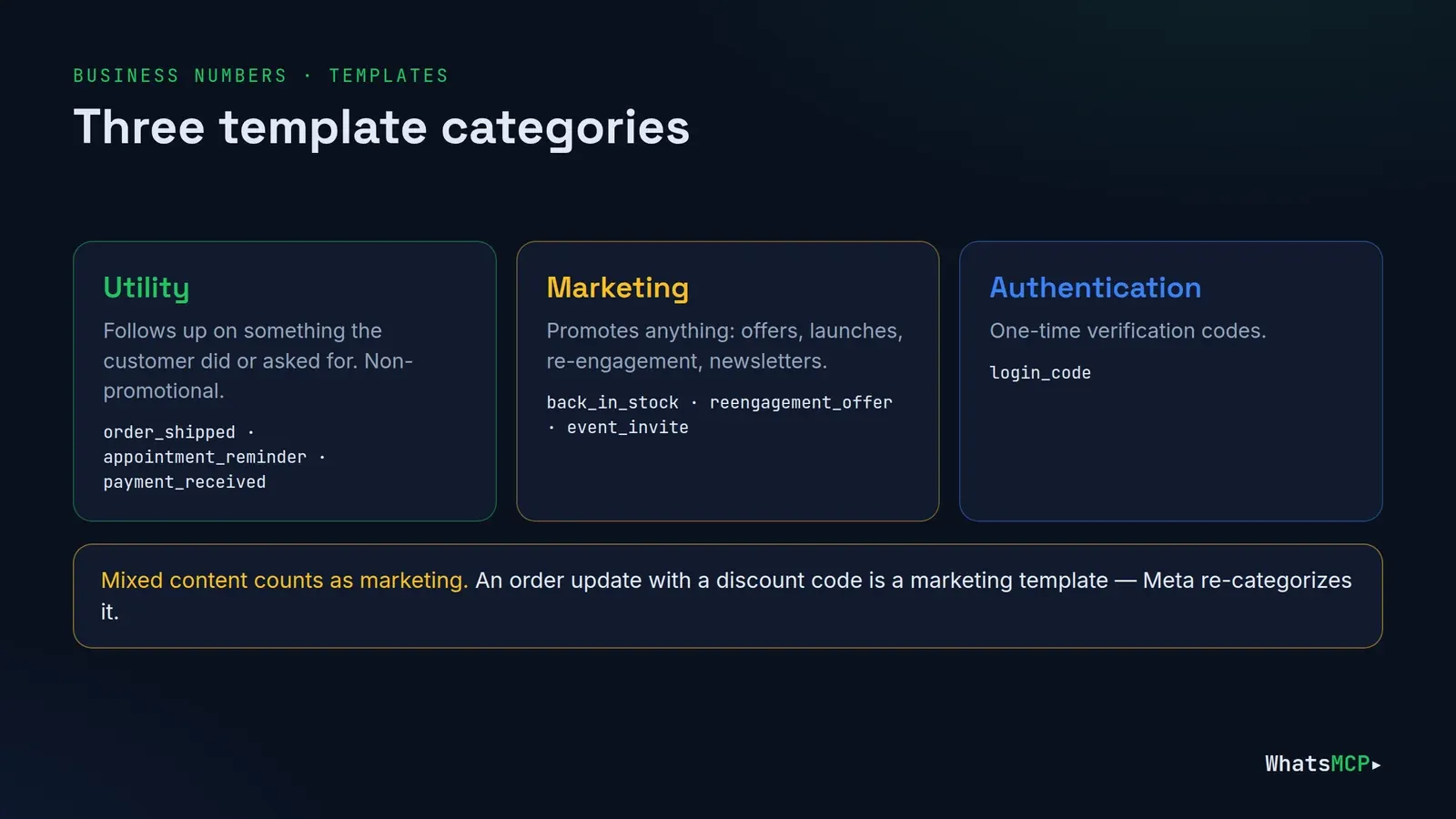
- Utility — follows up on something the customer did or asked for, or something essential to them: order and delivery updates, appointment reminders, account and billing notices. It must be non-promotional.
- Marketing — anything that promotes: offers, announcements, re-engagement, newsletters, "we miss you".
- Authentication — one-time verification codes.
Mixed content counts as marketing. An order update that ends with "use code SAVE10 on your next order" is a marketing template, whatever category you pick. Meta re-categorizes templates both at review and in recurring checks of approved ones, and it tells you when it does. If you think it got it wrong, you can ask Meta for a category review.
WhatsMCP's
wa_create_templatecreates Utility and Marketing templates. Its answer includes the category Meta actually assigned, which can differ from the one you asked for.
Anatomy and limits
| Part | Required | Limits |
|---|---|---|
| Name | Yes | Lowercase letters, digits and underscores, e.g. order_update |
| Language | Yes | One template per language, e.g. en_US, pt_BR; Meta doesn't translate |
| Header | No | Text up to 60 characters, at most one variable |
| Body | Yes | Up to 1,024 characters, variables {{1}}, {{2}}, … |
| Footer | No | Up to 60 characters, no variables |
| Buttons | No | Up to 10: quick replies, up to 2 URL buttons, 1 phone-number button |
Meta also supports media headers (image, video, document) and named variables like {{first_name}}; WhatsMCP's template tools use text headers and numbered variables.
Variables: the rules that cause most rejections
Variables are where most templates fail review. Meta's own rules:
- Number them in order.
{{1}},{{2}},{{3}}— no gaps, no skipping, braces matched. - Don't start or end the body with a variable.
{{1}}, your order has shippedandYour code is {{1}}are "dangling" and get rejected. Add words around them:Hi {{1}}, your order has shipped. - Keep the text-to-variable ratio sensible. A short message that is mostly placeholders reads as a blank cheque and gets rejected. Give each variable real context.
- No special characters in variables.
#,$and%inside the placeholder itself are rejected. - Provide sample values. Meta's reviewers read them. Make them realistic:
Adaand#10422, nottestandxxx.
Good habits beyond the rules: don't put two variables right next to each other, and at send time keep values on one line — no line breaks or long runs of spaces.
Common rejection reasons
- Variable formatting — dangling, out-of-order or unmatched variables (above).
- Wrong category — promotional content submitted as utility.
- Asking for sensitive data — full card numbers, full national ID numbers and the like. Partial values ("card ending 4242") are fine.
- Abusive or threatening content — including legal threats and public shaming.
- Policy violations — content against WhatsApp's Commerce or Business policies.
- Duplicates — the same wording as a template you already have.
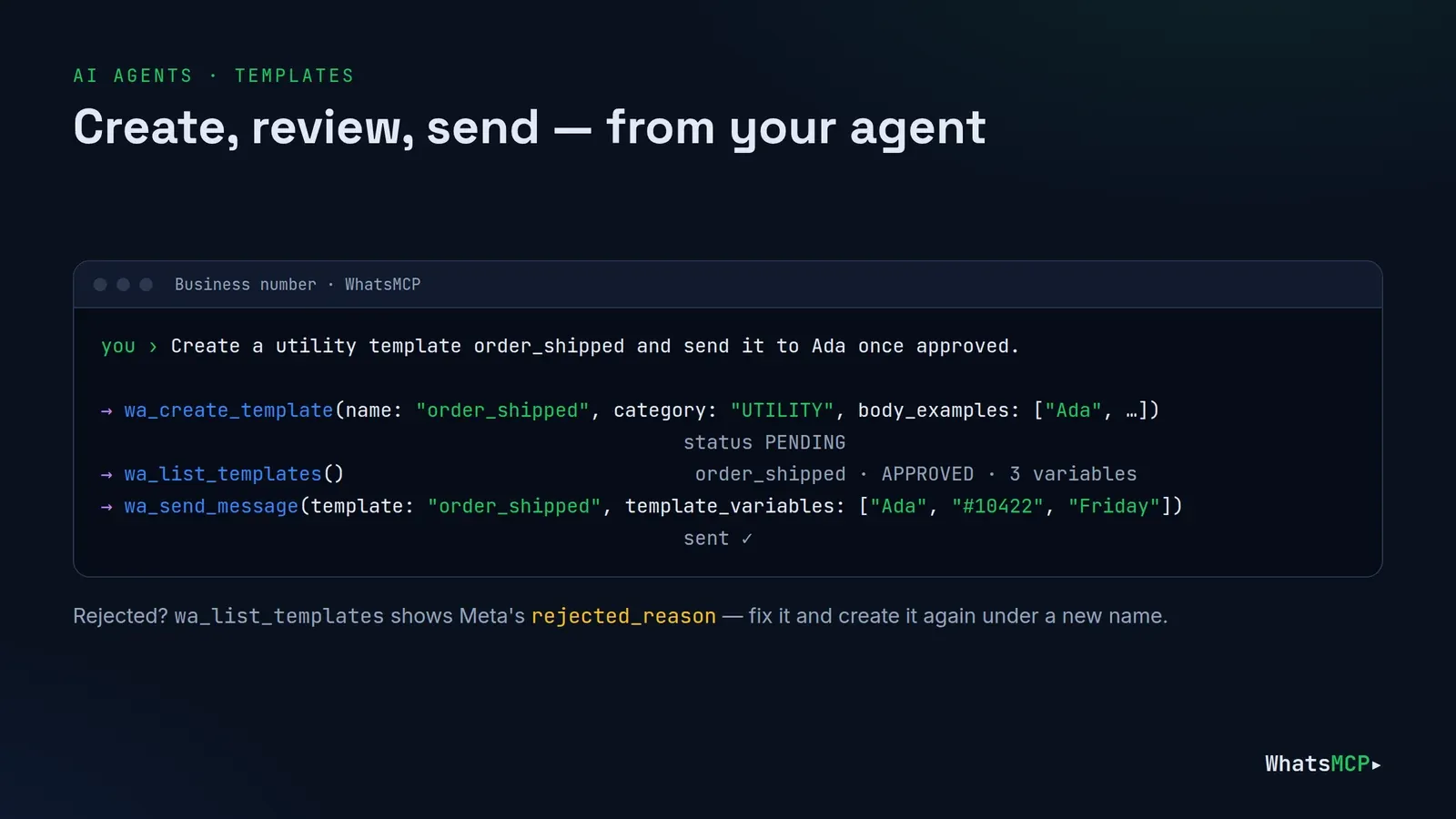
Review usually takes up to 24 hours. If a template is rejected, fix the cause and submit it again, or appeal if you believe Meta got it wrong. With WhatsMCP, wa_list_templates shows the rejected template with Meta's rejected_reason; create the corrected version under a new name. (A deleted template's name can't be reused for a while.)
After approval: quality and pausing
Approved templates are watched. If customers block you or report messages sent with a template, its quality rating drops, and Meta can pause it — for a few hours the first and second time, then disable it. The fix is the template, not the volume: make it more relevant, send it only to people who expect it, and give them an easy way to opt out.
Ten templates you can adapt
All of these follow the rules above: numbered variables, no variable at the start or end, realistic examples.
1. Order shipped — Utility
Hi {{1}}, good news: your order {{2}} has shipped and should arrive by {{3}}. Reply to this message if you have any questions.
2. Delivery window — Utility
Hi {{1}}, your delivery is booked for {{2}}. Reply here if that time doesn't work and we'll find another slot.
3. Appointment reminder — Utility
Hello {{1}}, this is a reminder of your appointment on {{2}} at {{3}}. Reply YES to confirm or NO to reschedule.
Buttons: quick replies Confirm and Reschedule.
4. Payment received — Utility
Thanks {{1}} — we've received your payment of {{2}} for invoice {{3}}. No action is needed.
5. Payment due — Utility
Hi {{1}}, invoice {{2}} for {{3}} is due on {{4}}. You can view and pay it using the link below.
Button: URL View invoice.
6. Support ticket update — Utility
Hi {{1}}, there's an update on your support request {{2}}: {{3}}. Reply to this message to continue the conversation.
7. Missed call follow-up — Utility
Hi {{1}}, sorry we missed your call earlier. Reply here and we'll pick it up straight away.
8. Back in stock — Marketing
Good news, {{1}}! {{2}} is back in stock. Tap below to see it before it sells out again.
Button: URL Shop now. Footer: Reply STOP to unsubscribe.
9. Re-engagement — Marketing
Hi {{1}}, it's been a while! Here's {{2}} off your next order with us, valid until {{3}}.
Footer: Reply STOP to unsubscribe.
10. Event invitation — Marketing
Hi {{1}}, you're invited to {{2}} on {{3}}. Tap below to save your place.
Button: URL Register.
Creating and sending templates from an AI agent
With your Business number connected to WhatsMCP, your agent can do the whole loop in plain language — in Claude, ChatGPT or any MCP client.
Create:
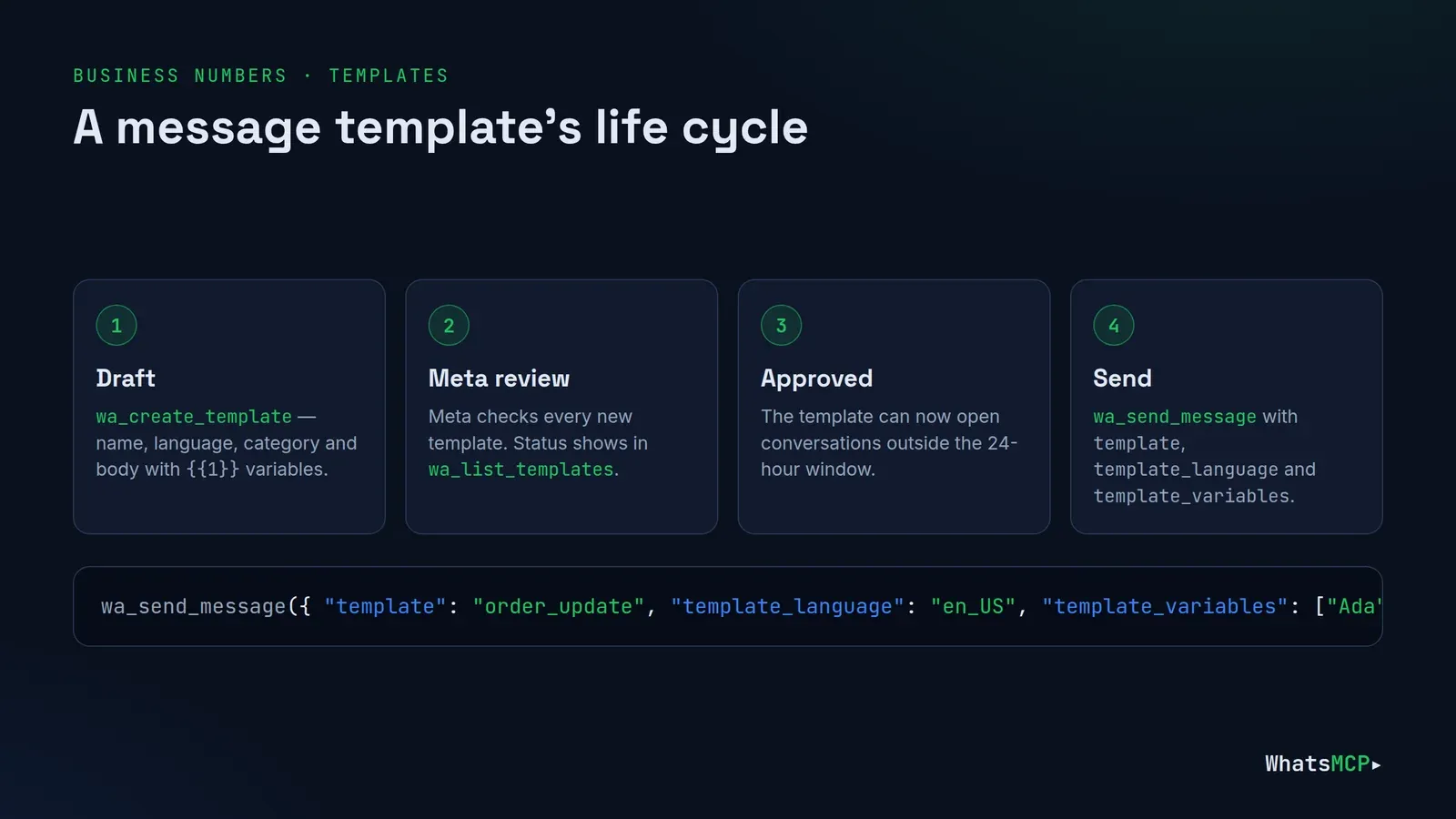
"Create a utility template called order_shipped in English: 'Hi {{1}}, good news: your order {{2}} has shipped and should arrive by {{3}}. Reply to this message if you have any questions.' Examples: Ada, #10422, Friday."
Behind it is one wa_create_template call:
wa_create_template({
  "account_id": "acct_…",
  "name": "order_shipped",
  "language": "en_US",
  "category": "UTILITY",
  "body": "Hi {{1}}, good news: your order {{2}} has shipped and should arrive by {{3}}. Reply to this message if you have any questions.",
  "body_examples": ["Ada", "#10422", "Friday"],
  "buttons": [{ "type": "QUICK_REPLY", "text": "Track my order" }]
})
Check: wa_list_templates lists every template with its status — PENDING while Meta reviews, then APPROVED or REJECTED with a reason — plus how many variables each one needs.
Send:
wa_send_message({ "account_id": "acct_…", "to": "447700900111",
                  "template": "order_shipped", "template_language": "en_US",
                  "template_variables": ["Ada", "#10422", "Friday"] })
Tidy up: wa_delete_template removes a template — one language, or every language of the name.
Checklist before you submit
- The category matches the content — no promotions in a utility template.
- Variables are numbered in order and none starts or ends the body.
- Every variable has words around it, and the examples are realistic.
- No request for full card numbers, ID numbers or passwords.
- Header and footer are under 60 characters; the body under 1,024.
- Marketing templates tell people how to opt out.
- The name is lowercase with underscores and says what the template is for.
FAQ
How long does template approval take?
Meta says review takes up to 24 hours, and it's often much faster.
Can I edit an approved template?
In WhatsApp Manager you can edit approved templates a limited number of times (Meta allows about one edit a day and ten a month), and an edit goes back to review. With WhatsMCP, the simplest path is to create a new version under a new name.
Why did my utility template become marketing?
Because something in it reads as promotional. Remove offers, discount codes and "check out our new…" language, or accept the marketing category.
Do I need a template to reply to a customer?
Not within 24 hours of their last message. After that, yes.
Can I use templates on a Personal WhatsApp number?
No. Templates are part of the WhatsApp Business API. A Personal number doesn't use them — see Personal WhatsApp vs WhatsApp Business API.
Get started
Create a WhatsMCP workspace and connect your Business number — your first Business plan starts with a 7-day free trial — and let your agent draft, submit and send templates for you.
About WhatsMCP Engineering
Engineering Team at WhatsMCP. The team building WhatsMCP's MCP server and SIP bridge — the people who wrote the code these posts describe.