Connect WhatsApp Business API to Claude
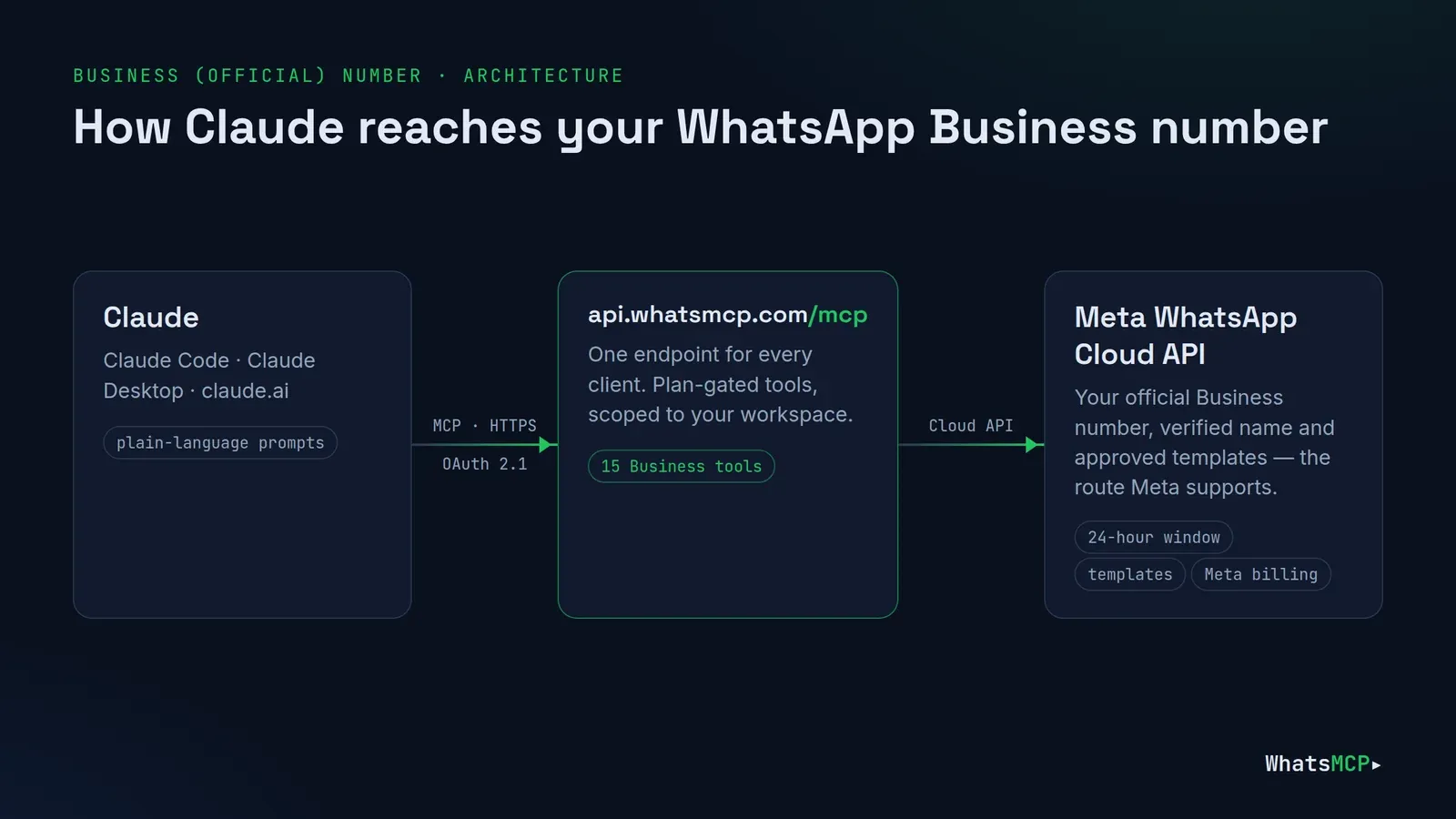
If your company talks to customers on WhatsApp, the number is probably on Meta's WhatsApp Business Platform — the official Cloud API, with a verified business name, message templates and Meta's own per-message billing. WhatsMCP connects that number to Claude. Claude can then answer inbound messages, follow up with an approved template, pull a customer's thread before a call, and hand anything it can't handle to a person — all through one MCP endpoint, in plain language.
This guide covers connecting an official WhatsApp Business API number to Claude Code, Claude Desktop and claude.ai: onboarding through Meta's Embedded Signup, the rules Meta sets and how Claude follows them, the tools a Business plan includes, prompts to try, and answers to common questions. For a personal number linked like WhatsApp Web, see Connect WhatsApp to Claude.
Why put Claude on your WhatsApp Business number
Customers write on WhatsApp at all hours, and most questions — order status, opening hours, rescheduling, "did you get my photo?" — follow a pattern. Claude is good at reading a thread and drafting the right answer; what it lacks on its own is a safe way to reach your official number. WhatsMCP is that bridge, and it is built around Meta's rules rather than around them:
- Official route. Business numbers use Meta's WhatsApp Cloud API — the supported way to automate WhatsApp — with your verified business name.
- Rules enforced up front. The 24-hour window and template requirements are checked before a message leaves, so Claude gets a clear refusal instead of a silent failure.
- One endpoint, many clients. The same URL serves Claude, ChatGPT, Grok, Cursor and your own backend over REST.
- No infrastructure. Nothing to host, no webhook receiver to build just to get started.
Before you start
- A Meta Business account you can sign in to with Facebook, and the phone number you want on WhatsApp — new, or already in a WhatsApp Business Account (WABA). If the number has a two-step verification PIN, turn it off (or reset it) in WhatsApp Manager first.
- A card for the trial. Business numbers run on a Business plan — Starter, Growth or Scale (see plans). Your workspace's first Business plan starts with a 7-day free trial: the card is taken at checkout and nothing is charged until the trial ends. Meta bills its own per-message charges to your WhatsApp Business Account directly, from the first message; we add no markup.
Step 1 — Create your workspace
Create your WhatsMCP workspace with your name and email, open the confirmation link, say how you'll use WhatsApp, and choose a password. You're signed in and setup opens Add a number.
Step 2 — Connect the number with Facebook
On Add a number (later: Fleet → Add Number), choose the WhatsApp Business card — Official Cloud API — and press Connect with Facebook. Meta's Embedded Signup opens: pick or create your WhatsApp Business Account, then the number. WhatsMCP registers the number on the Cloud API for you and takes you to Fleet: "Business number connected. It sends and receives through the WhatsApp Cloud API — no phone or tunnel needed."
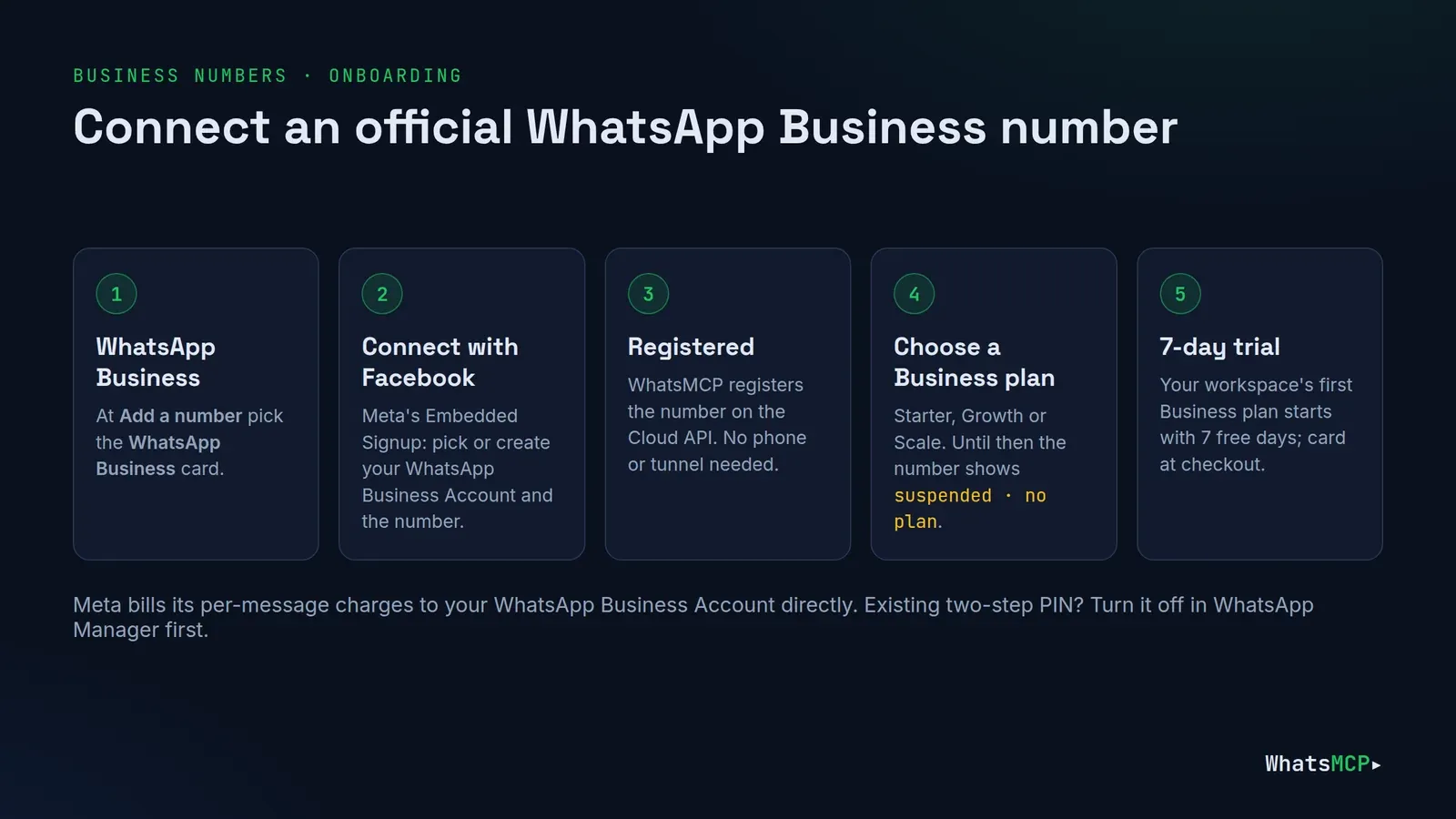
If Meta reports an existing two-step verification PIN, the console says so and the number can't send yet. Turn two-step verification off (or reset its PIN) for that number in WhatsApp Manager, then connect again.
Step 3 — Choose a Business plan
A newly connected Business number shows suspended · no plan in Fleet until it has one. Open its plan page from that badge: only the Business plans are offered for a Business number. Press Upgrade to the plan you want; Stripe Checkout opens, and your workspace's first Business plan starts its 7-day free trial. Only the workspace owner can check out.
Then press Resume setup in Fleet for the API key & MCP step — a Business number needs no egress step, because Meta's cloud does the sending.
Step 4 — Connect Claude
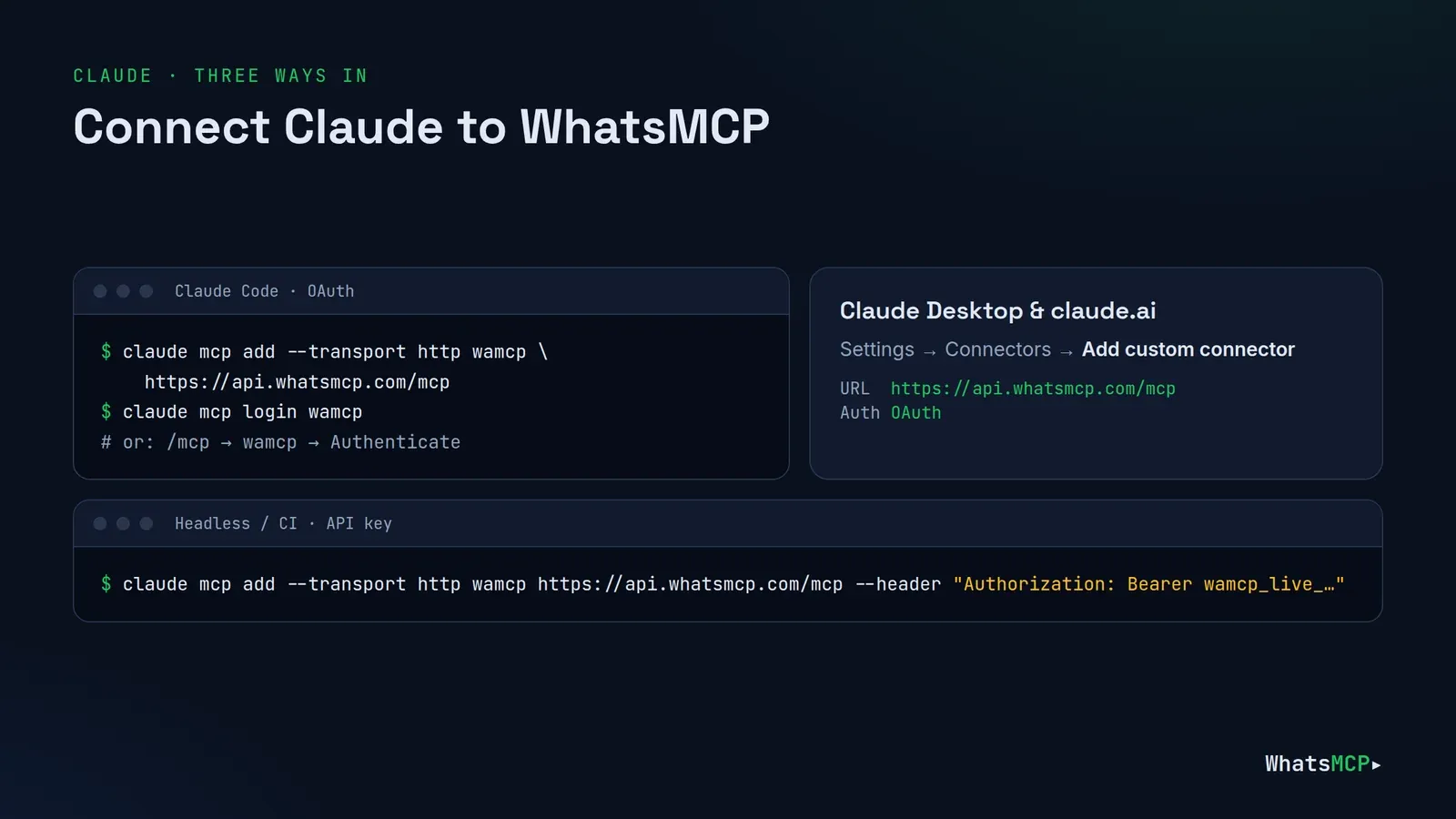
The endpoint is the same one Personal numbers use, https://api.whatsmcp.com/mcp, and one connection serves both kinds of number.
Claude Code:
claude mcp add --transport http wamcp https://api.whatsmcp.com/mcp
claude mcp login wamcp
Claude Desktop and claude.ai: Settings → Connectors → Add custom connector, URL https://api.whatsmcp.com/mcp, Authentication: OAuth, then sign in when Claude asks.
Sign-in is standard OAuth 2.1 with PKCE: you approve the client in the WhatsMCP console and nothing secret is pasted anywhere. For servers and CI, use an API key from Console → API keys instead — Authorization: Bearer <key> in Claude Code, or an x-api-key header in the claude.ai dialog with Authentication set to None. A claude.ai connector keeps the authentication type it was created with, so to switch from a key to OAuth, delete and re-add it.
The rules Meta sets — and how Claude follows them
The official API is the route Meta supports for automation, and it comes with rules. WhatsMCP enforces them before anything is sent.
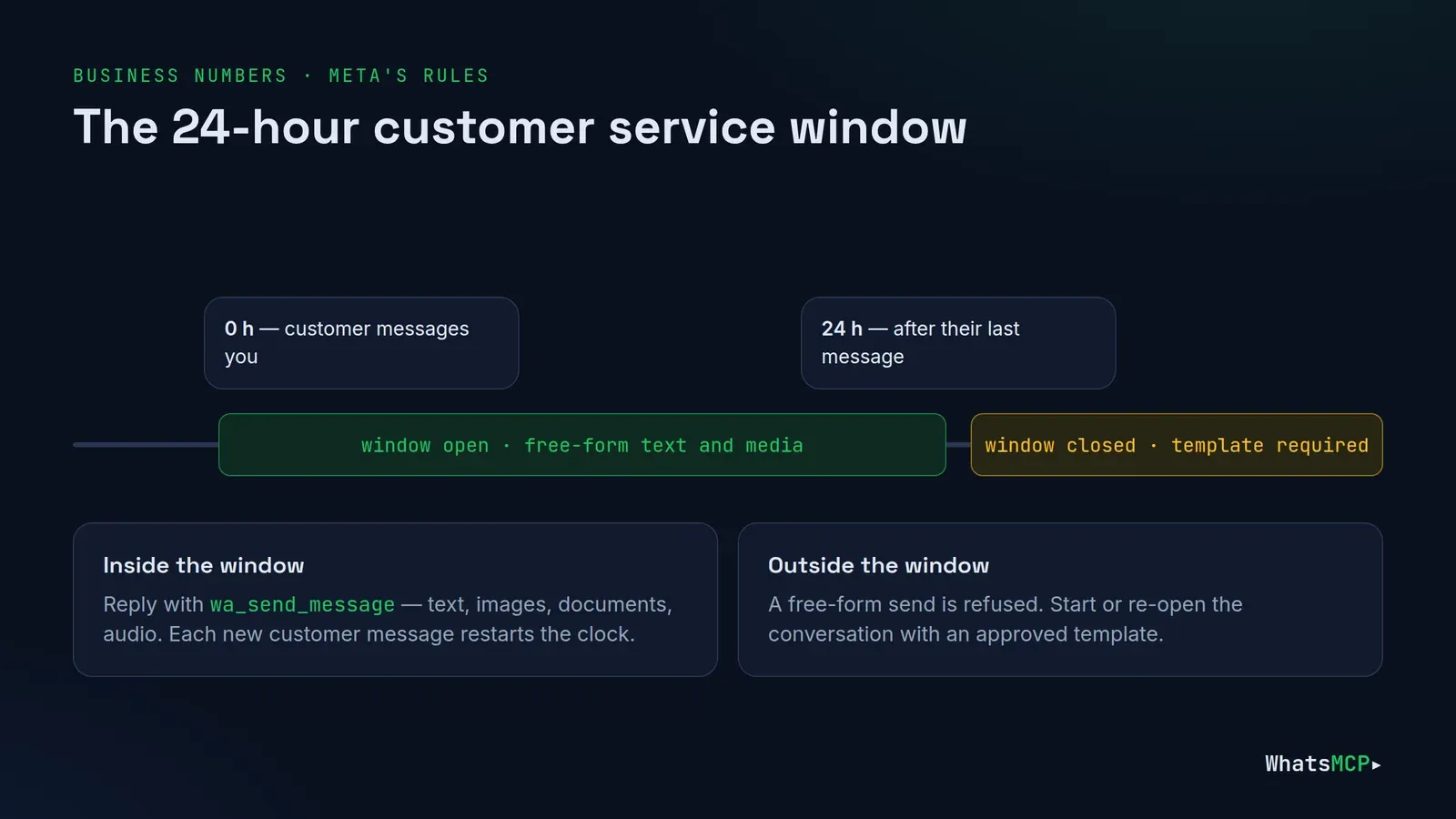
The 24-hour customer service window
Within 24 hours of a customer's last message, Claude can reply with ordinary text and media — images, documents, audio. Every new message from the customer restarts the clock. Outside the window, a free-form send is refused and a template is required.
Message templates
Meta requires a pre-approved template to start a conversation or to re-open one after 24 hours. Claude can manage them with wa_list_templates, wa_create_template and wa_delete_template — Meta reviews each new one — and send one with wa_send_message:
wa_send_message({ "account_id": "acct_…", "to": "447700900111",
                  "template": "order_update", "template_language": "en_US",
                  "template_variables": ["Ada", "#10422"] })   // fills {{1}}, {{2}}
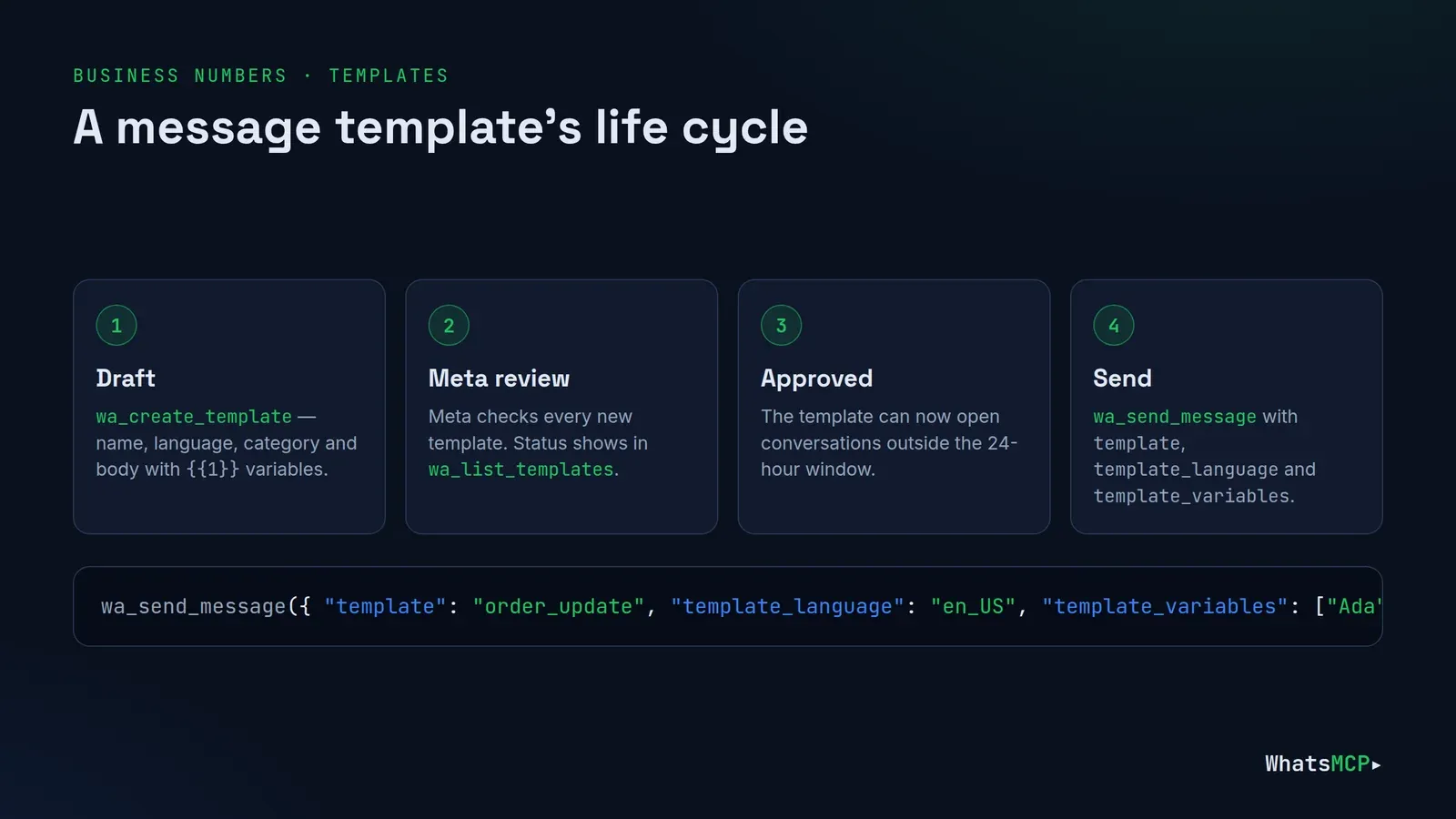
Write templates the way Meta likes them: one clear purpose, variables for the parts that change, and no promotional language in a utility template.
Billing
Meta charges per message under its own pricing — since 1 October 2026 that includes replies inside the 24-hour window — so "reply to everything" has a cost. Keep Claude's replies purposeful and combine answers into one message where you can.
What a Business number can't do
Groups, channels, contacts, history import, presence, reactions, edits, deletes, blocking, profiles and calls belong to Personal numbers. If Claude reaches for one, it gets a backend_capability refusal naming the feature. wa_list_accounts lists each number's backend and features, so Claude can tell up front.
The 15 tools on a Business plan
On a Business plan, Claude works with 15 tools:
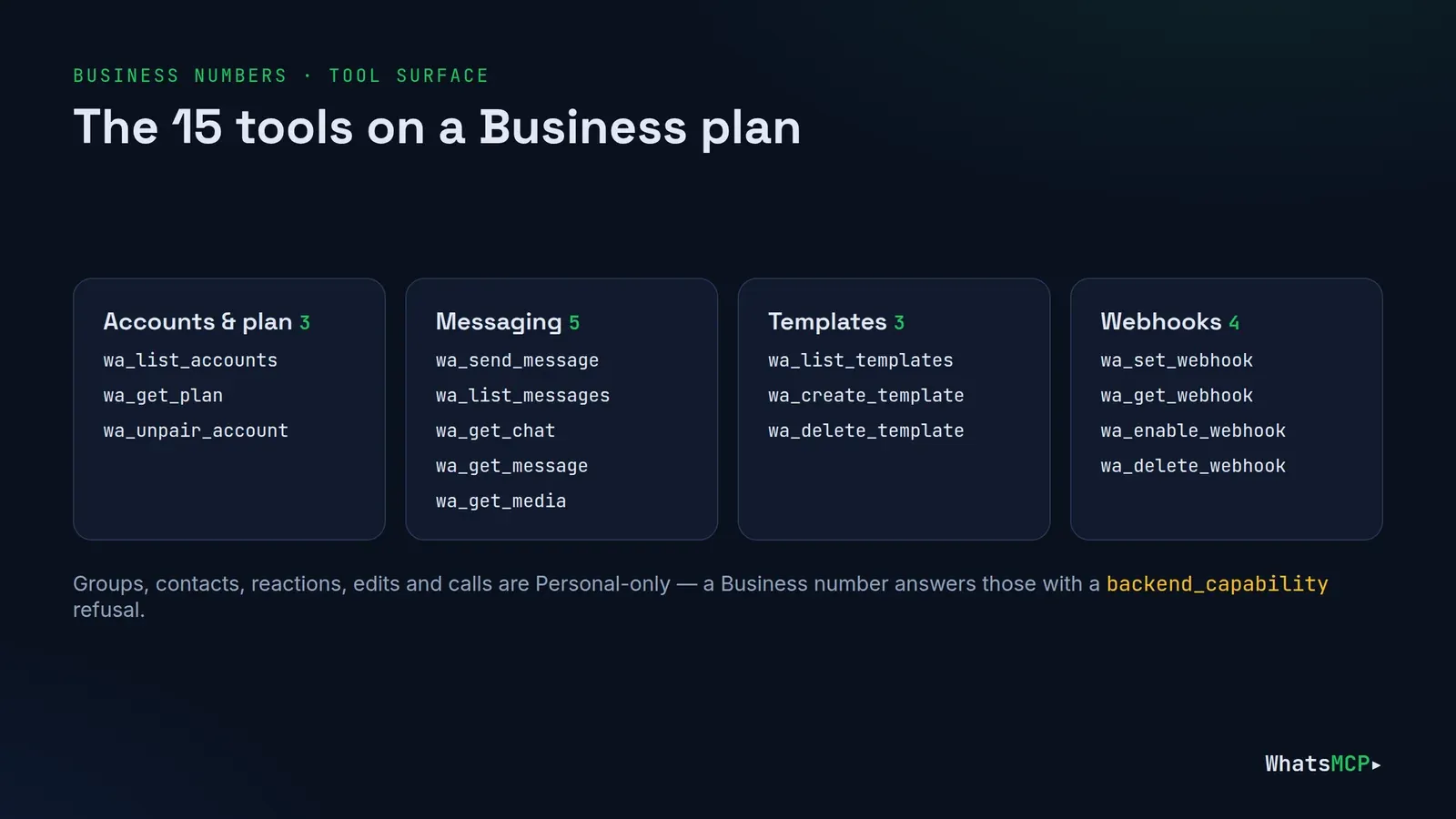
| Area | Tools |
|---|---|
| Accounts and plan | wa_list_accounts, wa_get_plan, wa_unpair_account |
| Messaging | wa_send_message, wa_list_messages, wa_get_chat, wa_get_message, wa_get_media |
| Templates | wa_list_templates, wa_create_template, wa_delete_template |
| Webhooks | wa_set_webhook, wa_get_webhook, wa_enable_webhook, wa_delete_webhook |
wa_list_messages reads with a cursor, so an agent can pick up exactly where it left off. Inbound images and documents are stored and fetched with wa_get_media.
Prompts to try
1. Clear the support queue.
"Show me every customer who messaged our business number in the last 24 hours and hasn't had a reply. Draft an answer for each one and show me before sending."
Claude reads with wa_list_messages, groups by customer with wa_get_chat, and drafts replies while they're still inside the window. You approve; it sends with wa_send_message.
2. Follow up with a template.
"List our approved templates. For the customers from yesterday's list who never replied, send the order_update template with their name and order number."
Because those conversations are past 24 hours, Claude uses wa_list_templates to find an approved one and sends it with the variables filled in — never a free-form message Meta would refuse.
3. Draft a new template for review.
"Create a utility template called delivery_window in English: 'Hi {{1}}, your delivery is booked for {{2}}. Reply here if that time doesn't work.'"
Claude submits it with wa_create_template; wa_list_templates shows its status once Meta has reviewed it.
4. Read what the customer sent.
"The customer at +44 7700 900111 says they sent a photo of the damaged item. Show me what's in it and draft a reply."
wa_get_message and wa_get_media fetch the image so Claude can describe it and suggest the next step.
5. Hand over to a person.
"Summarise today's conversation with Ada for the support team in five bullet points, including what she's asked for and what we promised."
A read-only summary from wa_get_chat — paste it into your helpdesk or ticket.
Use cases by team
Customer support. Triage the overnight queue, draft answers for anything routine, and summarise the rest for a person to pick up. Inside the 24-hour window replies are free-form; outside it, Claude picks an approved template.
Sales and bookings. Confirm appointments, send a reminder template the day before, and answer "can I move it to Friday?" in the same thread. Templates with variables keep each message personal without writing it by hand.
Operations and logistics. Send order, delivery and status updates as utility templates, then handle the replies that come back — "I won't be home", "can you leave it with a neighbour?" — while the window is open.
Feedback and quality. Ask Claude to read a week of conversations and list the most common questions, complaints and requests. It's a read-only job that turns an inbox into a product backlog.
Hand-offs to your systems. Pair Claude with a webhook and the REST API: your backend records every conversation in your CRM or helpdesk, and Claude handles the drafting.
Put it on autopilot with webhooks
For a customer-facing number you'll want new messages pushed to you rather than fetched. wa_set_webhook registers an HTTPS endpoint; each inbound message is delivered as signed JSON as it arrives, with a cursor you can use to fetch the full message. Your backend — or an agent you run — decides what to do and replies through the same tools or the REST API. See WhatsMCP webhooks: setup guide.
Good habits for a customer-facing number
- Keep a human in the loop for anything beyond routine answers. "Draft, then show me" costs a few seconds.
- Use templates deliberately. Name them clearly, keep a small set, and delete ones you no longer use.
- Use your backend too. Everything Claude does here is also available over the REST API with an API key, for CRMs and scripts.
- Revoke what you don't use at Console → Connections and Console → API keys.
FAQ
Is this the official WhatsApp Business API?
Yes. Business numbers on WhatsMCP run on Meta's WhatsApp Cloud API, connected through Meta's own Embedded Signup. WhatsMCP itself is an independent service, not affiliated with Meta.
Who pays Meta's message fees?
Meta bills its per-message charges to your WhatsApp Business Account directly, under Meta's pricing. Your WhatsMCP plan is separate, and we add no markup to Meta's fees.
How does the 7-day free trial work?
Your workspace's first Business plan starts with 7 free days — one trial per workspace, not per number. A card is taken at checkout and nothing is charged until the trial ends; MCP, REST, templates and webhooks all work meanwhile. The trial covers our plan only — Meta bills its per-message charges from the first message.
Why was Claude's reply refused?
Usually because the 24-hour window has closed — send a template instead — or because the action is Personal-only, in which case the refusal names the feature.
Can Claude and my CRM use the same number?
Yes. MCP, REST and webhooks all work on the same number at once, each with its own credentials.
Get started
Connect with Facebook, add one URL to Claude, and your official WhatsApp Business number has an assistant that knows Meta's rules. Start your 7-day trial, see the WhatsApp Business API page for plans, and the full tool reference at whatsmcp.com/docs/mcp. Using ChatGPT? See Connect WhatsApp Business API to ChatGPT.
About WhatsMCP Engineering
Engineering Team at WhatsMCP. The team building WhatsMCP's MCP server and SIP bridge — the people who wrote the code these posts describe.