Connect WhatsApp Business API to ChatGPT
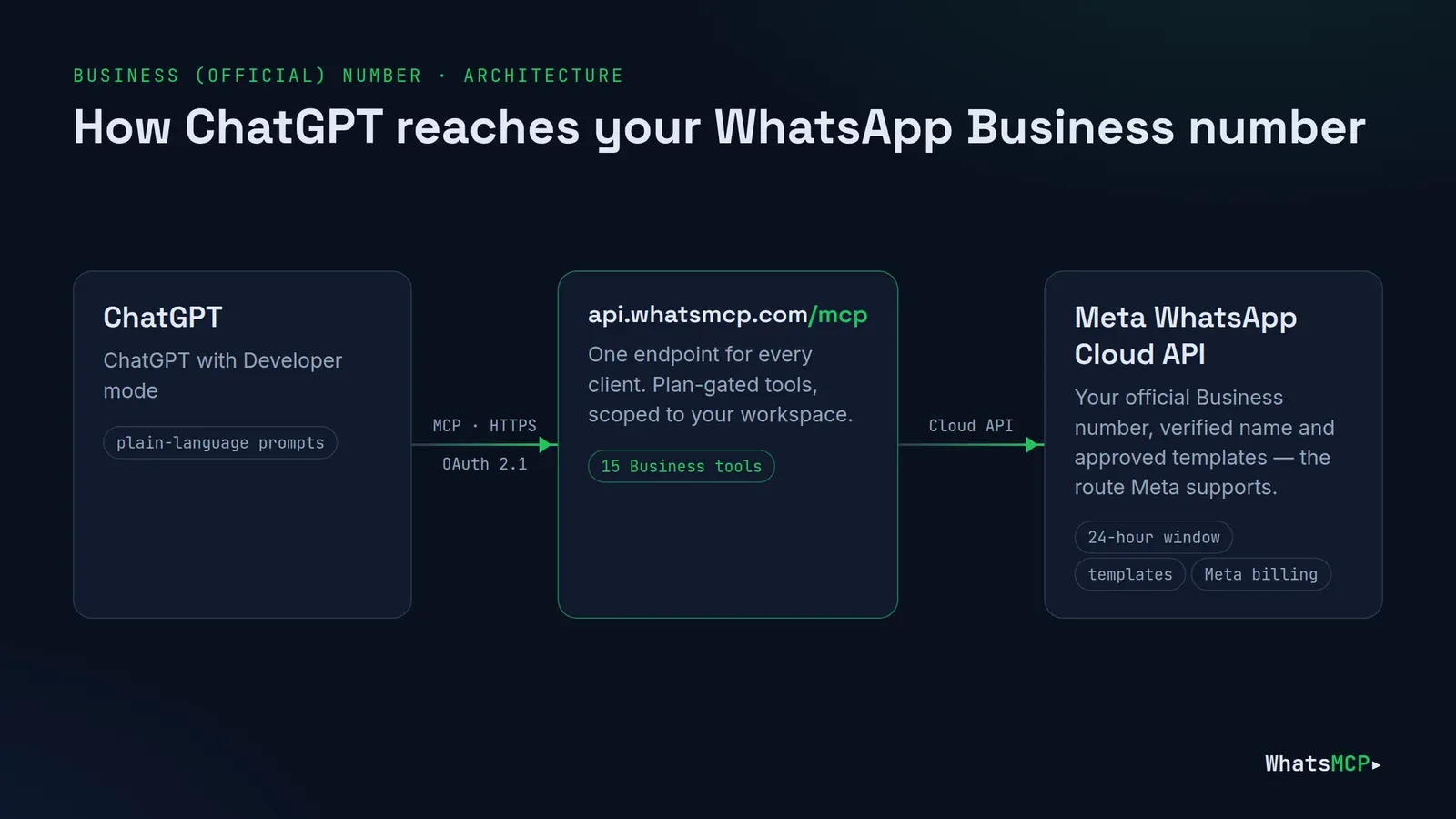
Your customers already message your business on WhatsApp. With WhatsMCP, ChatGPT can work that inbox: read what came in, reply while the conversation is open, follow up with an approved template, and draft new templates for Meta to review — on your official WhatsApp Business API number, with Meta's rules enforced before a message leaves.
This guide covers connecting an official WhatsApp Business number to ChatGPT: onboarding through Meta's Embedded Signup, adding the ChatGPT connector, the 24-hour window and templates, the tools a Business plan includes, prompts to try, troubleshooting and FAQs. For a personal number linked like WhatsApp Web, see Connect WhatsApp to ChatGPT.
Why connect ChatGPT to your WhatsApp Business number
Support teams answer the same questions every day — where's my order, can I change the time, did you get my photo. ChatGPT drafts those answers well; WhatsMCP gives it a safe, official way to read and send on your Business number:
- Official API. Business numbers run on Meta's WhatsApp Cloud API with your verified business name.
- Meta's rules built in. Free-form replies only inside the 24-hour window; templates outside it. Refusals are explicit.
- Same number, many surfaces. ChatGPT, Claude, your CRM over REST and your webhooks can all work the same number.
Before you start
- A Meta Business account you can sign in to with Facebook, and the phone number you want on WhatsApp — new, or already in a WhatsApp Business Account (WABA). If the number has a two-step verification PIN, turn it off (or reset it) in WhatsApp Manager first.
- ChatGPT with Developer mode available on your plan or company workspace.
- A card for the trial. Business numbers run on a Business plan — Starter, Growth or Scale (see plans). Your workspace's first Business plan starts with a 7-day free trial: the card is taken at checkout and nothing is charged until the trial ends. Meta bills its own per-message charges to your WhatsApp Business Account directly, from the first message; we add no markup.
Step 1 — Create your workspace
Create your WhatsMCP workspace with your name and email, open the confirmation link, say how you'll use WhatsApp, and choose a password. You're signed in and setup opens Add a number.
Step 2 — Connect the number with Facebook
On Add a number (later: Fleet → Add Number), choose the WhatsApp Business card — Official Cloud API — and press Connect with Facebook. Meta's Embedded Signup opens: pick or create your WhatsApp Business Account, then the number. WhatsMCP registers the number on the Cloud API for you and takes you to Fleet: "Business number connected. It sends and receives through the WhatsApp Cloud API — no phone or tunnel needed."
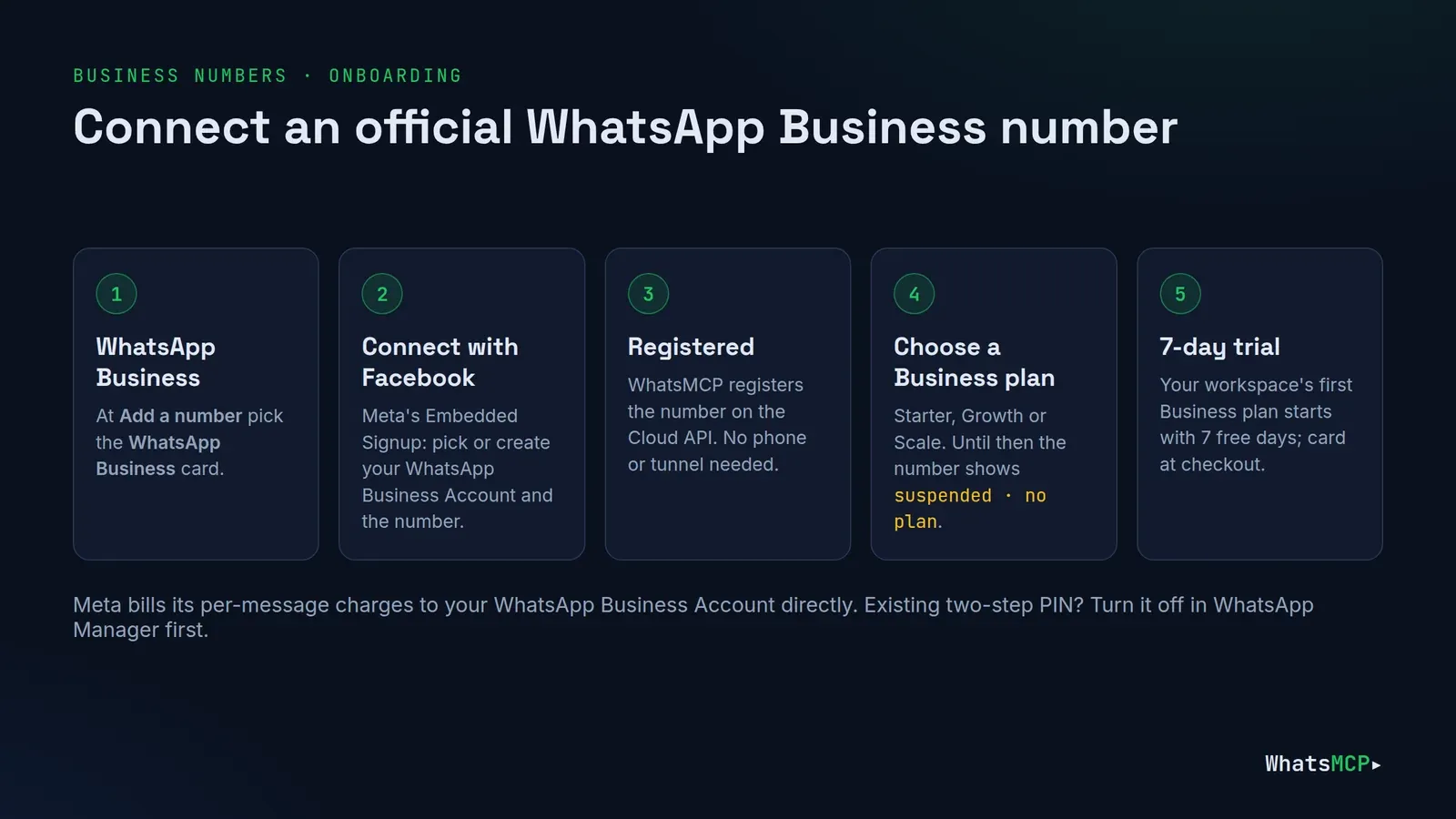
If Meta reports an existing two-step verification PIN, the console says so and the number can't send yet. Turn two-step verification off (or reset its PIN) for that number in WhatsApp Manager, then connect again.
Step 3 — Choose a Business plan
A newly connected Business number shows suspended · no plan in Fleet until it has one. Open its plan page from that badge: only the Business plans are offered for a Business number. Press Upgrade to the plan you want; Stripe Checkout opens, and your workspace's first Business plan starts its 7-day free trial. Only the workspace owner can check out.
Then press Resume setup in Fleet for the API key & MCP step — a Business number needs no egress step, because Meta's cloud does the sending.
Step 4 — Connect ChatGPT
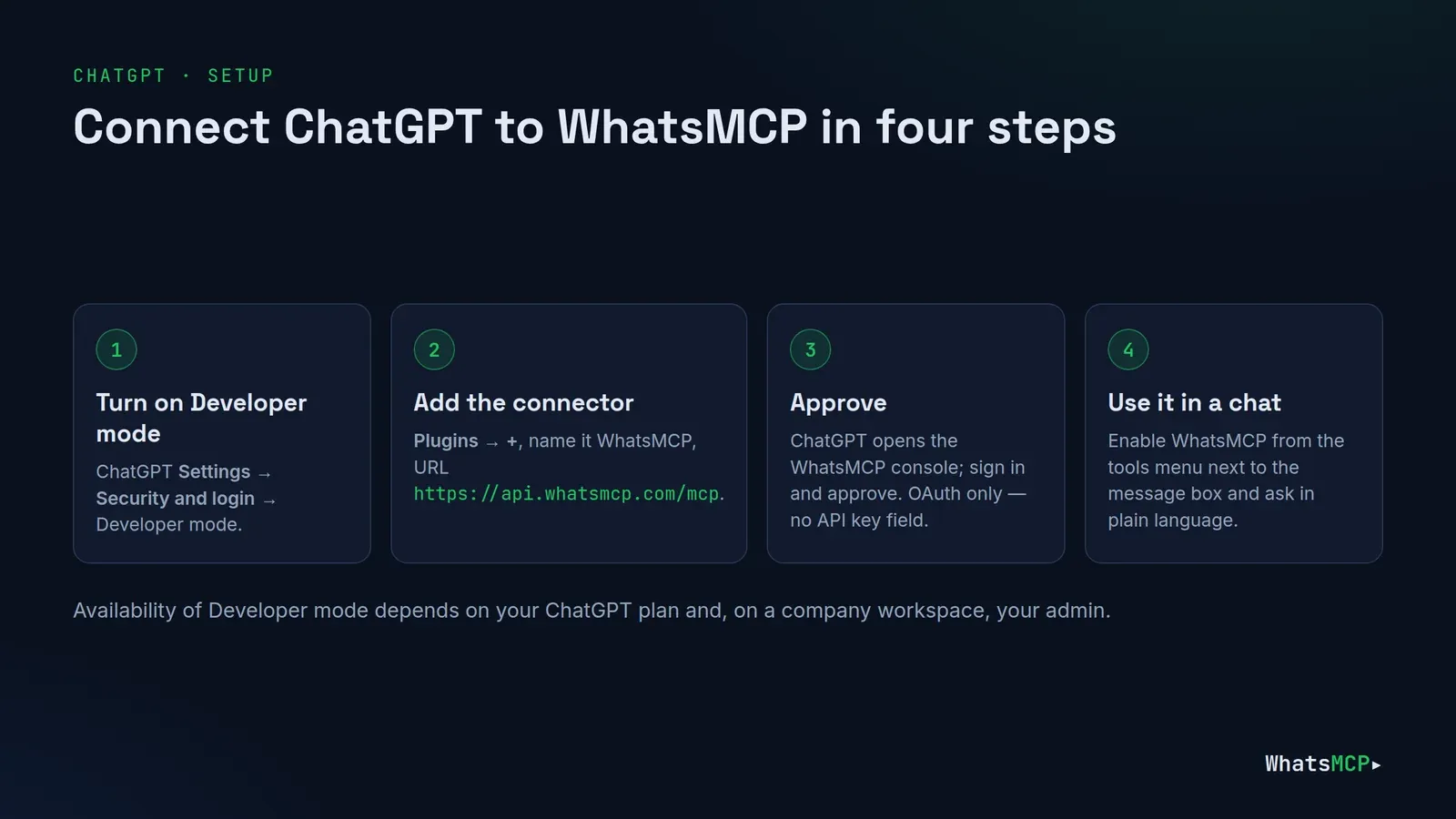
- Settings → Security and login → turn on Developer mode.
- Open Plugins, press +, name it WhatsMCP and enter
https://api.whatsmcp.com/mcp. - Save and approve the connection when ChatGPT sends you to the WhatsMCP console.
- In a chat, enable WhatsMCP from the tools menu next to the message box.
ChatGPT connects with OAuth only — its dialog has no header field for an API key — so nothing secret is pasted anywhere. You can revoke ChatGPT on its own at Console → Connections. The same connector serves Business and Personal numbers alike.
How Meta's rules show up in ChatGPT
The 24-hour window
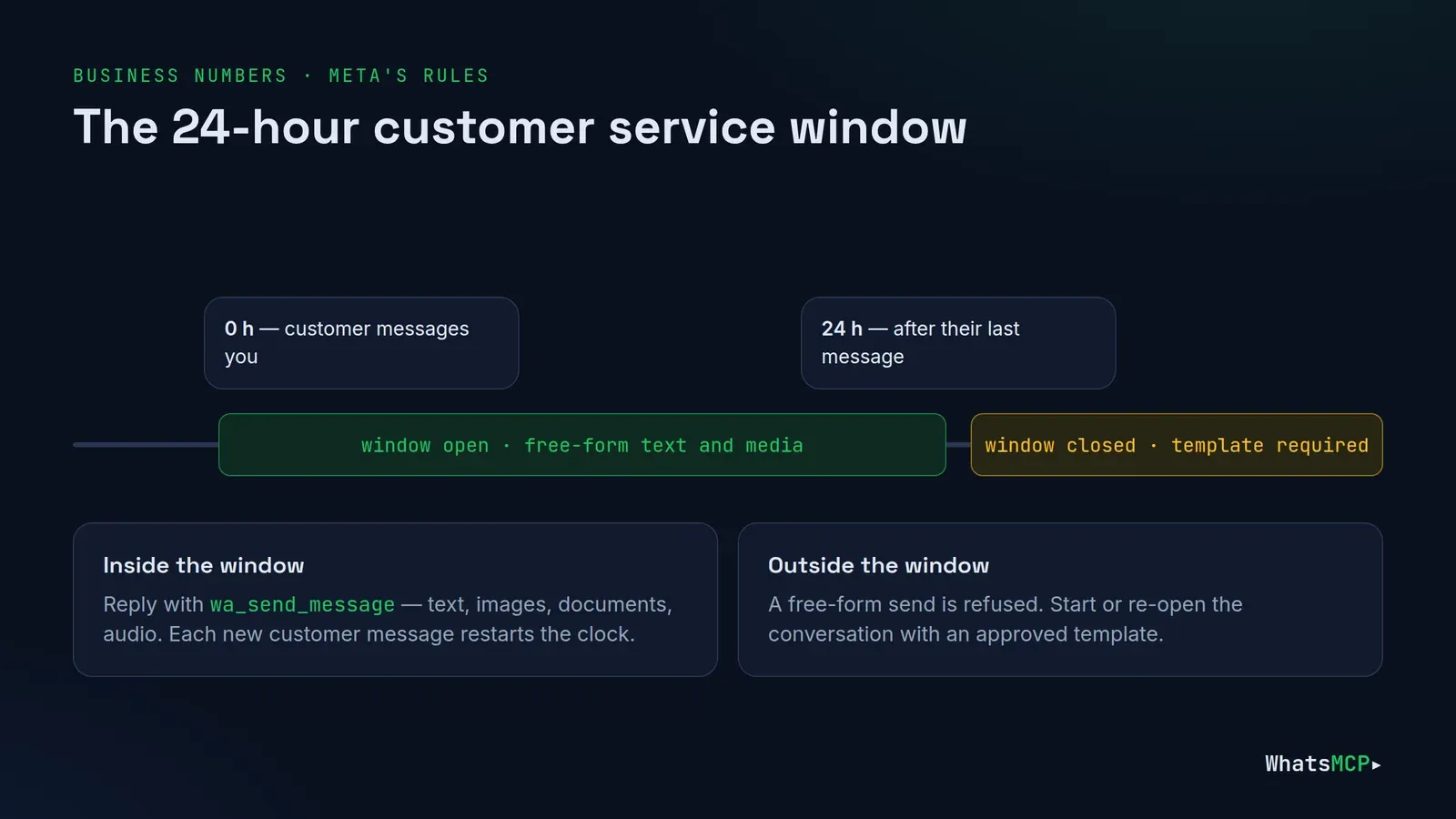
For 24 hours after a customer's last message, ChatGPT can reply with free-form text and media. After that, a free-form send is refused and it must use a template.
Templates
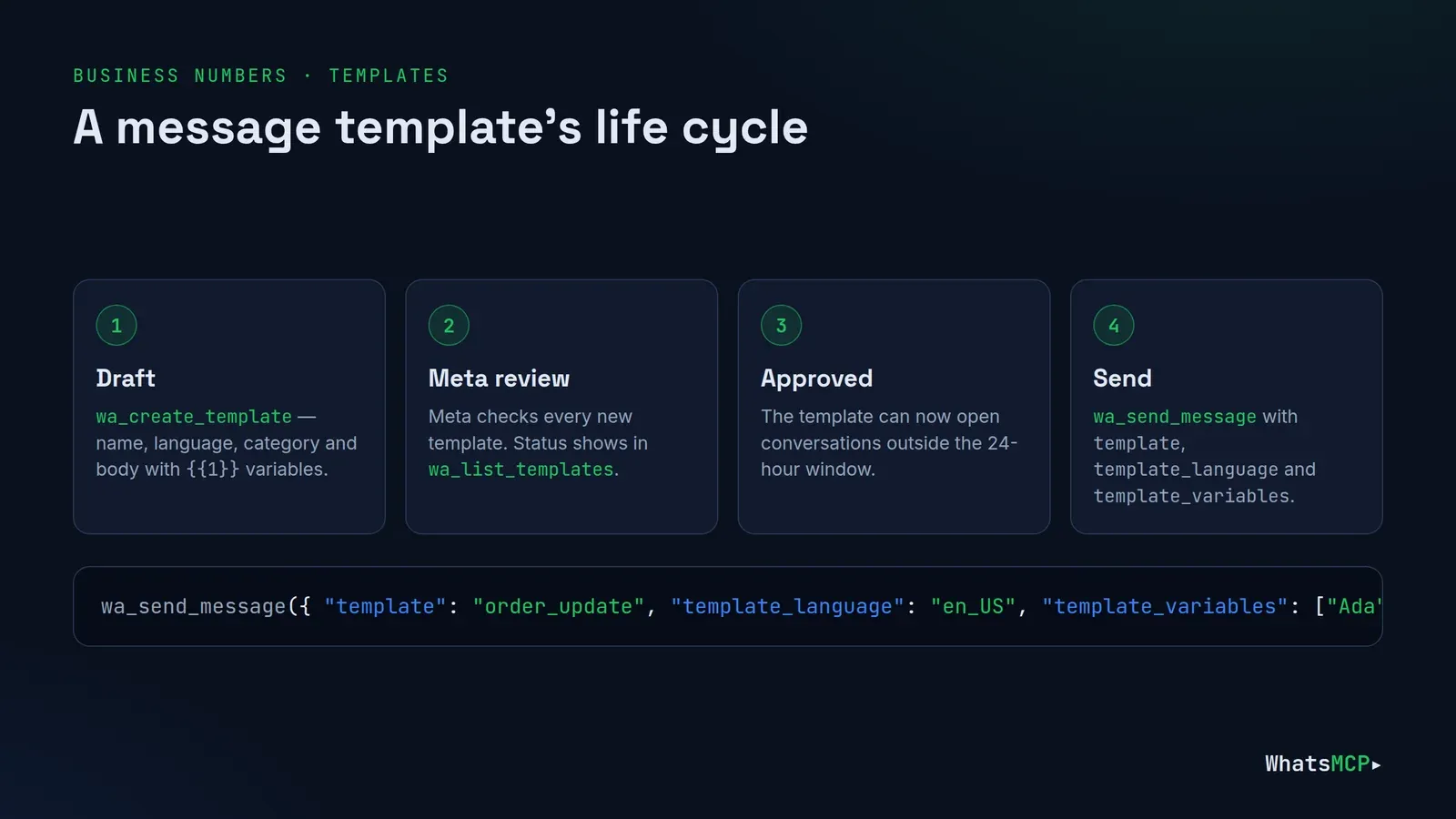
A pre-approved template is required to start a conversation or re-open one. ChatGPT lists them with wa_list_templates, submits new ones with wa_create_template (Meta reviews each), removes them with wa_delete_template, and sends one through wa_send_message with template, template_language and template_variables.
Billing
Meta charges per message under its own pricing, and since 1 October 2026 that includes replies inside the 24-hour window. Keep the agent's messages purposeful.
Personal-only features
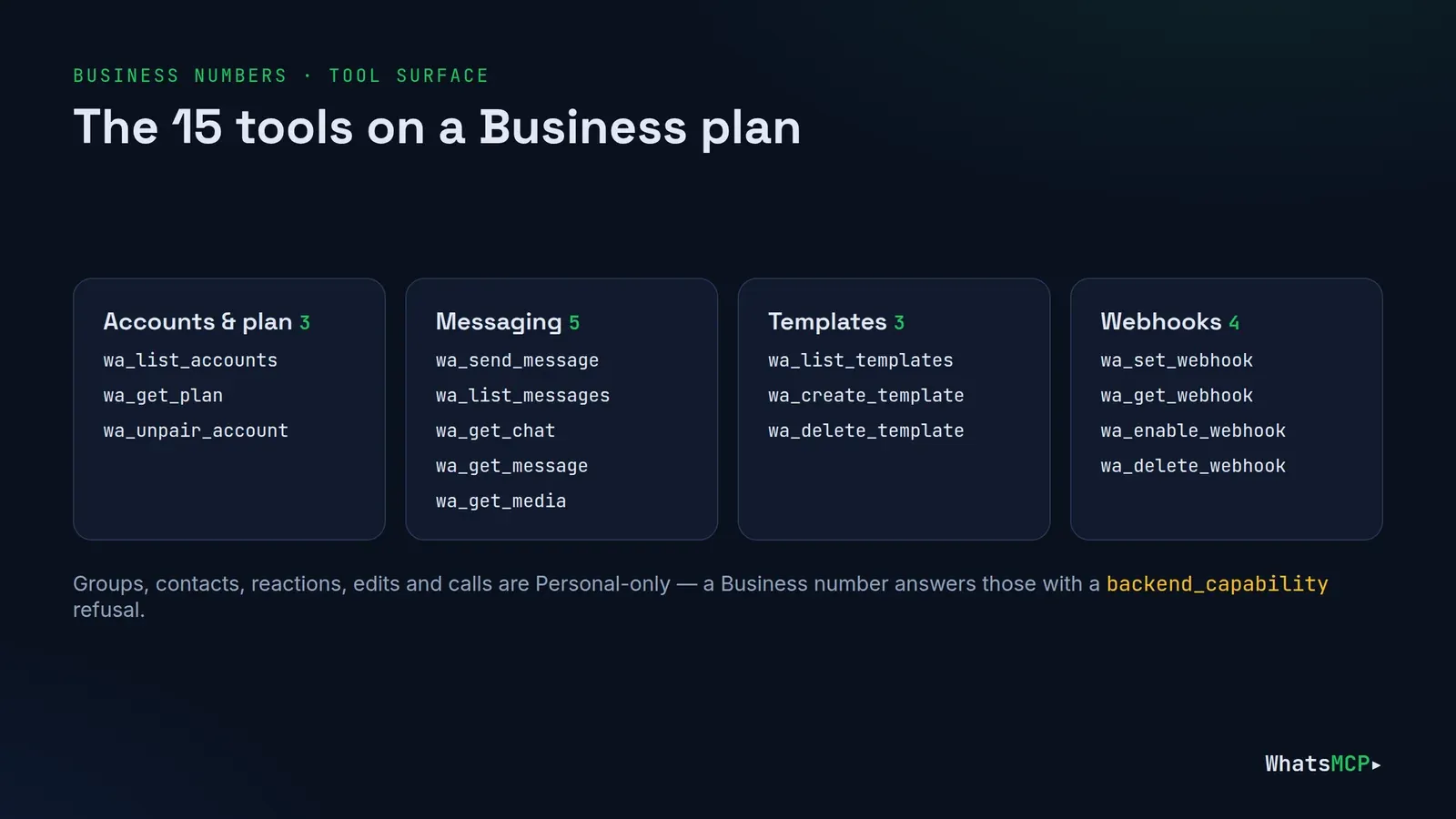
Groups, channels, contacts, history import, presence, reactions, edits, deletes, blocking, profiles and calls aren't available on the official API. If ChatGPT tries one, it gets a backend_capability refusal naming the feature — and wa_list_accounts lists each number's features up front.
The tools ChatGPT gets
On a Business plan ChatGPT has 15 tools: accounts and plan (wa_list_accounts, wa_get_plan, wa_unpair_account), messaging (wa_send_message, wa_list_messages, wa_get_chat, wa_get_message, wa_get_media), the three template tools, and four for webhooks. Each tool is marked read-only or not, so ChatGPT can ask before it sends anything.
Prompts to try
1. Who's waiting on us?
"List customers who messaged our business number today and haven't had a reply yet, with a one-line summary of what each one wants."
Read-only: wa_list_messages plus wa_get_chat for context.
2. Reply while the window is open.
"Draft replies for the first three. Show me, and send the ones I approve."
ChatGPT drafts, you approve, and it sends with wa_send_message.
3. Re-engage with a template.
"For customers whose last message was more than a day ago, send our order_update template with their name and order number."
ChatGPT picks an approved template with wa_list_templates and fills the variables, instead of a free-form message Meta would reject.
4. Write a new template.
"Draft a utility template for appointment reminders with the customer's name and time as variables, and submit it for review."
wa_create_template submits it; check its status later with wa_list_templates.
5. Look at an attachment.
"A customer sent a photo of their receipt this morning — what's the order number on it?"
wa_get_media fetches the image so ChatGPT can read it.
Use cases by team
Customer support. Triage the overnight queue, draft answers for anything routine, and summarise the rest for a person to pick up. Inside the 24-hour window replies are free-form; outside it, ChatGPT picks an approved template.
Sales and bookings. Confirm appointments, send a reminder template the day before, and answer "can I move it to Friday?" in the same thread. Templates with variables keep each message personal without writing it by hand.
Operations and logistics. Send order, delivery and status updates as utility templates, then handle the replies that come back — "I won't be home", "can you leave it with a neighbour?" — while the window is open.
Feedback and quality. Ask ChatGPT to read a week of conversations and list the most common questions, complaints and requests. It's a read-only job that turns an inbox into a product backlog.
Hand-offs to your systems. Pair ChatGPT with a webhook and the REST API: your backend records every conversation in your CRM or helpdesk, and ChatGPT handles the drafting.
Troubleshooting
- A PIN error when connecting — the number's two-step verification PIN must be cleared in WhatsApp Manager; then reconnect.
- A free-form reply was refused — the 24-hour window has closed; use a template.
- No Plugins or "+" — Developer mode is off or not allowed on your plan or workspace.
- A tool is missing — it isn't part of your plan or doesn't apply to Business numbers; Console → Help shows what's included.
FAQ
Is this the official WhatsApp Business API?
Yes. Business numbers on WhatsMCP run on Meta's WhatsApp Cloud API, connected with Meta's Embedded Signup. WhatsMCP is an independent service, not affiliated with Meta or OpenAI.
Who pays for messages?
Meta bills its per-message charges to your WhatsApp Business Account under Meta's pricing. Your WhatsMCP plan is separate; your workspace's first Business plan starts with a 7-day free trial.
Can ChatGPT message customers who never wrote to us?
Only with an approved template, as Meta requires — and only people who have agreed to hear from you.
Can my CRM use the same number?
Yes. The REST API and webhooks work alongside ChatGPT on the same number, each with its own credentials.
Get started
Connect with Facebook, add one URL to ChatGPT, approve — and your official WhatsApp Business number has an assistant that respects Meta's rules. Start your 7-day trial, see the WhatsApp Business API page for plans, and whatsmcp.com/docs/mcp for the tool reference. On Claude instead? See Connect WhatsApp Business API to Claude.
About WhatsMCP Engineering
Engineering Team at WhatsMCP. The team building WhatsMCP's MCP server and SIP bridge — the people who wrote the code these posts describe.