Personal WhatsApp vs WhatsApp Business API
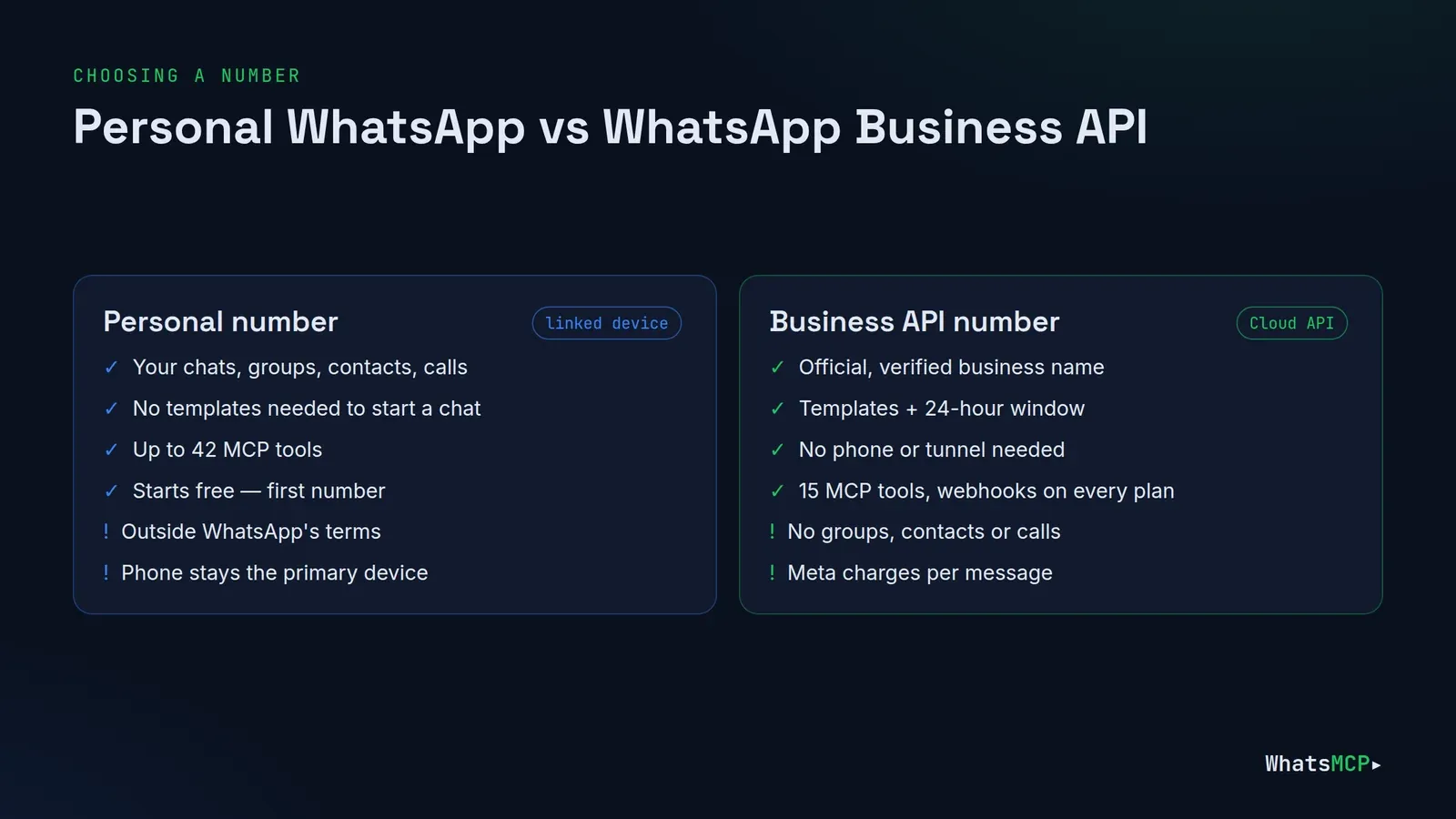
You want an AI agent — Claude, ChatGPT, Grok, Cursor or your own — to work with WhatsApp. The first decision isn't which model to use. It's which kind of WhatsApp number the agent should drive: an ordinary number linked the way WhatsApp Web is, or an official number on Meta's WhatsApp Business API (the Cloud API).
They behave very differently. One gives an agent everything you can do on your phone — groups, contacts, calls, reactions — but sits outside WhatsApp's terms of service. The other is the officially supported route for businesses, with a verified name and message templates, but it plays by Meta's rules and Meta's per-message pricing.
WhatsMCP supports both from one workspace and one MCP endpoint, so you don't have to commit to a single answer. This guide compares them side by side, walks through the trade-offs that matter for AI agents, and ends with a simple way to choose.
The short answer
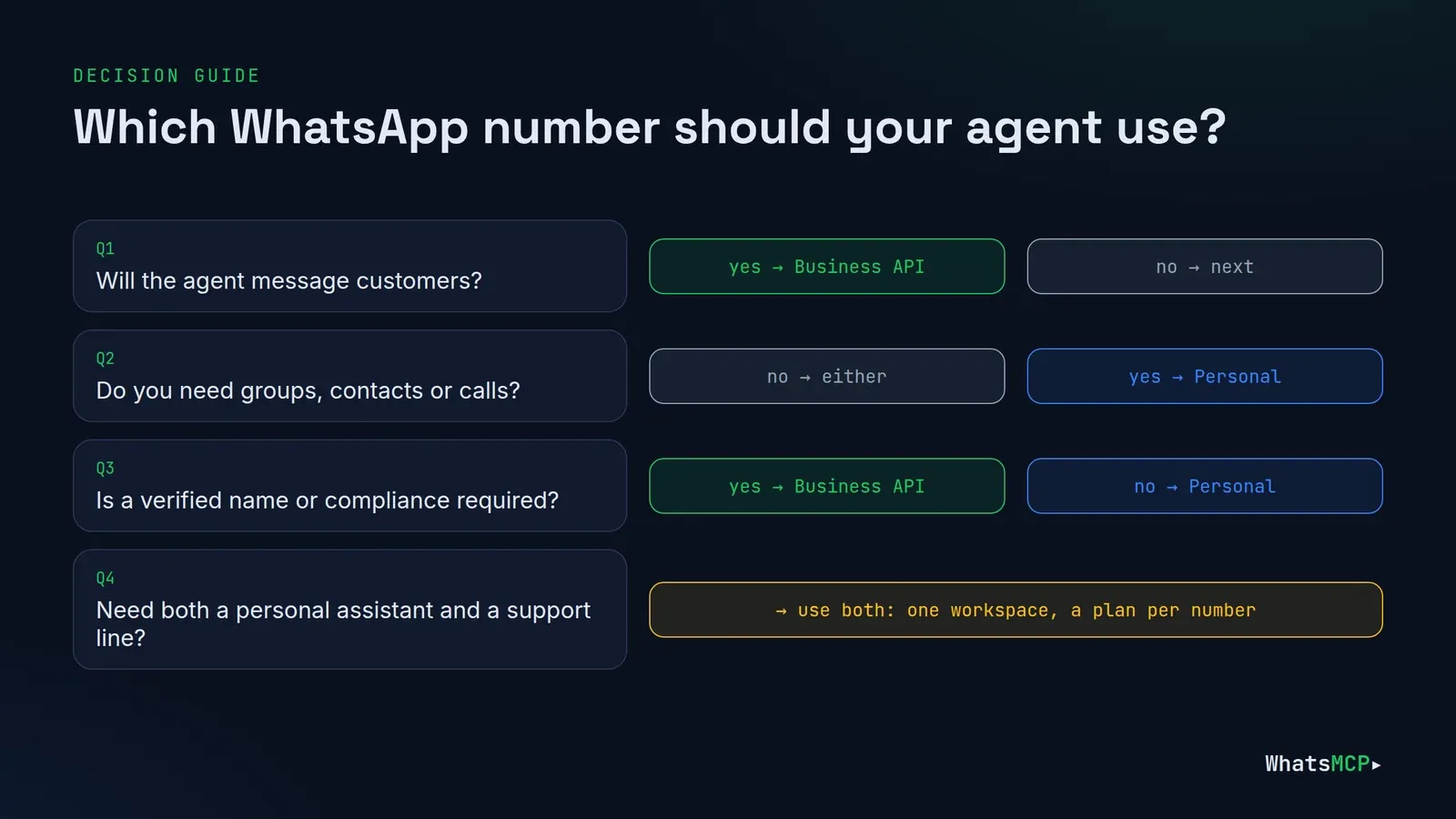
- Choose a Personal number if the agent works for you: your own chats, your groups, your contacts, your calls. Assistants, personal automation, small-team coordination, prototypes.
- Choose a Business API number if the agent talks to customers: support, bookings, order updates, notifications — anything at volume, or anything where a verified business name and compliance matter.
- Use both if you need both. In WhatsMCP each number has its own plan, and one workspace can mix Personal and Business numbers.
How each one connects
Personal number: a linked device
A Personal number joins WhatsMCP as a linked device, exactly like WhatsApp Web or Desktop. You scan a QR code from WhatsApp → Settings → Linked devices on your phone, and your phone stays the primary device. Your recent chats, groups and contacts come with it.
Because WhatsMCP connects to WhatsApp the way a WhatsApp client does, a new Personal number reaches WhatsApp through WhatsMCP's Default Random VPN (or through your own WireGuard tunnel or SOCKS5 proxy, if you prefer — see egress options).
Business number: Meta's Cloud API
A Business number is registered on the WhatsApp Business Platform. In WhatsMCP you press Connect with Facebook, pick or create your WhatsApp Business Account in Meta's dialog, and WhatsMCP registers the number on the Cloud API. No phone has to stay online and no tunnel is involved: Meta's own infrastructure sends and receives.
What the agent can do
| Personal number | Business API number | |
|---|---|---|
| Send and read messages | ✓ | ✓ |
| Images, documents, audio | ✓ | ✓ |
| Start a conversation | ✓ any time | Only with an approved template |
| Reply freely | ✓ | Within 24 hours of the customer's last message |
| Message templates | — | ✓ create, list, delete, send |
| Groups and channels | ✓ create, join, admin | — |
| Contacts and profiles | ✓ | — |
| Reactions, edits, deletes | ✓ | — |
| Typing / presence | ✓ | — |
| Blocklist | ✓ | — |
| Call history and voice calls | ✓ on plans with voice | — |
| Webhooks for inbound messages | ✓ on paid plans | ✓ every plan |
| Verified business name | — | ✓ |
| Phone must stay linked | Phone stays the primary device | No phone needed |
| MCP tools available | up to 42 | 15 |
On a Business number, a tool that needs a Personal-only feature answers with a clear backend_capability refusal naming the feature, and wa_list_accounts lists each number's features up front — so an agent knows before it tries.
Rules and risk
This is the part that should drive the decision for anything customer-facing.
Personal numbers fall outside WhatsApp's terms of service. WhatsMCP is an independent service, not affiliated with Meta, and connecting a number as a linked device for automation isn't something WhatsApp endorses. WhatsApp may restrict a number it sees as misused. That's an acceptable trade-off for a personal assistant on a number you can spare — keep traffic personal, no bulk or unsolicited messages — and the wrong one for your company's main customer line.
Business numbers are the supported route. Meta built the Cloud API for exactly this: businesses automating conversations with customers. The price of that is Meta's rules:
- Templates to start conversations. Anything that opens a conversation — or re-opens one after 24 hours — must use a template Meta has approved. See how to write templates Meta approves.
- The 24-hour window. Free-form replies are allowed for 24 hours after the customer's last message.
- Opt-in. Meta expects customers to have agreed to hear from you.
WhatsMCP checks the template and window rules before anything is sent, so an agent gets a refusal it can act on instead of a silent failure.
What it costs
Both kinds of number are billed per number in WhatsMCP, on separate plan ladders — see Plans for current prices and limits.
- Personal numbers start free: your workspace's first Personal number takes the free line automatically, with a small daily message allowance, a few days of history and the core tools. Paid Personal plans add webhooks, groups and channels, longer history and voice calls.
- Business numbers have their own ladder — Business Starter, Growth and Scale — with higher limits and longer history. Your workspace's first Business plan starts with a 7-day free trial.
- Meta's fees are separate. For a Business number, Meta charges per message under its own pricing and bills your WhatsApp Business Account directly; since 1 October 2026 that includes replies inside the 24-hour window. WhatsMCP adds no markup. Personal numbers have no Meta fees.
Setup, side by side
| Step | Personal | Business |
|---|---|---|
| 1 | Create a workspace | Create a workspace |
| 2 | Add a number → Personal WhatsApp → Link a device via QR | Add a number → WhatsApp Business → Connect with Facebook |
| 3 | Scan from your phone's Linked devices | Pick your WhatsApp Business Account and number in Meta's dialog |
| 4 | First number takes the free line; others need a plan | Choose a Business plan (first one starts with a 7-day trial) |
| 5 | Egress: Default Random VPN, or your own tunnel | No egress step |
| 6 | Connect your AI client to https://api.whatsmcp.com/mcp |
Same endpoint, same client |
The guides for each client cover both paths: Claude, Claude + Business API, ChatGPT, ChatGPT + Business API, Grok, Cursor and Codex.
Which one for your use case
| Use case | Best fit | Why |
|---|---|---|
| Personal assistant: triage, replies, reminders | Personal | Needs your real chats, contacts and groups |
| Family or team group coordination | Personal | Groups are Personal-only |
| Prototyping an agent | Personal | Free to start, every tool available on higher plans |
| Customer support inbox | Business | Supported route, verified name, scales |
| Order, delivery and appointment updates | Business | Utility templates are made for this |
| Marketing messages | Business | Requires opted-in recipients and marketing templates |
| Call-centre or PBX bridging | Personal | Calls are Personal-only today |
| Both a personal assistant and a support line | Both | One workspace, two numbers, two plans |
Can I use both?
Yes. Plans are per number, so a workspace can hold a Personal number for your own assistant and a Business number for customers. Your AI client connects once, to the same endpoint, and wa_list_accounts shows every number with its backend and features, so the agent picks the right one for each task.
FAQ
Is the WhatsApp Business app the same as the WhatsApp Business API?
No. The WhatsApp Business app is a phone app for small businesses; to WhatsMCP a number on it is linked like any Personal number. The WhatsApp Business API (Cloud API) is Meta's platform for programmatic messaging — that's what WhatsMCP's Business numbers use.
Can an AI agent message customers who never wrote to us?
On a Business number, only with an approved template, and only to people who agreed to hear from you. On a Personal number, technically yes — but unsolicited messages are exactly what gets numbers restricted.
Which is cheaper?
A Personal number can be free on the free line and never pays Meta. A Business number has a WhatsMCP plan plus Meta's per-message charges. For customer messaging, the Business API is still the right choice: it's the supported, scalable route.
Do I need a different AI client for each?
No. Claude, ChatGPT, Grok, Cursor and Codex all connect to the same endpoint, and the same connection works for both kinds of number.
Get started
Not sure yet? Start with whichever matches your first use case — you can add the other later in the same workspace.
- Create a free workspace and link a Personal number
- Create a workspace and connect a Business number — your first Business plan starts with a 7-day trial.
About WhatsMCP Engineering
Engineering Team at WhatsMCP. The team building WhatsMCP's MCP server and SIP bridge — the people who wrote the code these posts describe.